Localize an Unreal Engine 5 game with a local LLM (Ollama or LM Studio)
A model running on your own machine is the cheapest way to get a first translation of an Unreal Engine game: there is no API key, no per-token bill, and your text never leaves your computer. This guide sets that up with LocHub, an editor plugin for UE 5.6–5.8, and either Ollama or LM Studio.
A small local model can make more mistakes than a large hosted one — a dropped {PlayerName} here, a lost plural
form there. That is the part LocHub is for: every translation is checked for broken format arguments, plural forms and
rich-text tags before you can approve it, so a weaker model costs you review time, not a broken build.
What you need
- Unreal Engine 5.6, 5.7 or 5.8 (LocHub is tested on Windows).
- Node.js 22.11 or newer — LocHub runs a small local service on
127.0.0.1. - Ollama or LM Studio with a model you have downloaded.
- LocHub, from Fab or cloned from
GitHub into your project’s
Plugins/LocHub, then enabled in Edit > Plugins. It is free for non-commercial projects (personal projects, education, game jams, free games).
1. Start the model — and give it enough context
With Ollama, pull a model, for example:
ollama pull qwen3:8b
Raise Ollama’s context window before you translate anything. Ollama’s default context (num_ctx, 4096 tokens
on current builds) is smaller than a full translate request — 40 strings plus the system prompt, glossary and
brief — and Ollama silently truncates what does not fit instead of returning an error. That is the most common
reason a local job comes back garbled or incomplete. Start the server with a larger window:
OLLAMA_CONTEXT_LENGTH=16384 ollama serve
or set PARAMETER num_ctx 16384 in the model’s Modelfile. LM Studio and llama.cpp server have the same setting
under their own launch options.
2. Point LocHub at it
Open Project Settings > Plugins > LocHub > AI and set AI Provider to Custom (OpenAI-compatible):
| Setting | Ollama | LM Studio |
|---|---|---|
| Base URL | http://localhost:11434/v1 |
http://localhost:1234/v1 |
| API Key | empty | empty |
| Key Header | Authorization: Bearer | Authorization: Bearer |
| Translate Model | the name ollama list shows, e.g. qwen3:8b |
the ID LM Studio shows for the loaded model |
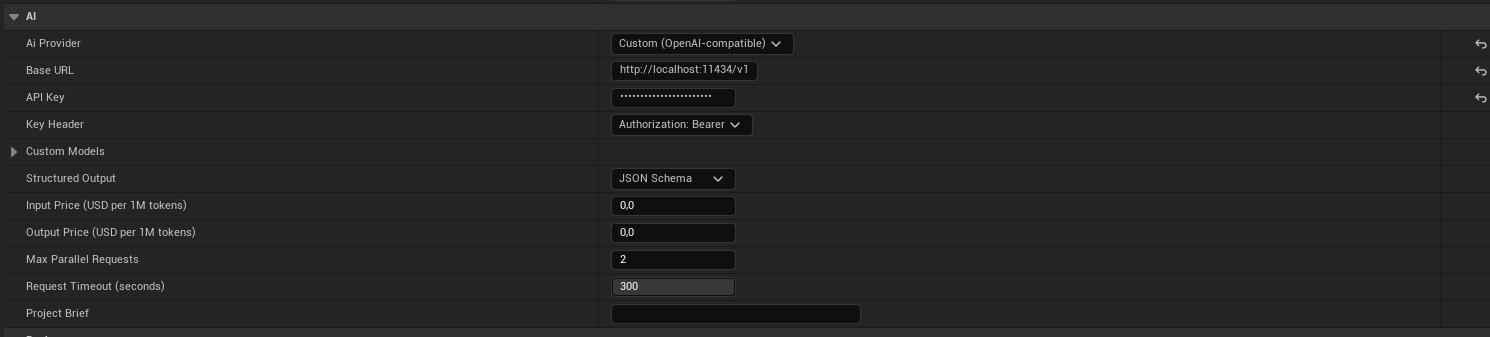
A few more fields matter for a local model:
- Judge Model — leave it empty to let the same model review its own translations, or name a second model.
- Structured Output — start with JSON Schema. If the server rejects it or the answers come back broken, switch to JSON Object, then to Prompt Only.
- Max Parallel Requests — how many requests LocHub sends at once (default 2). Keep it low on a single GPU.
- Input Price / Output Price — leave both at
0for a free local model. The estimate then shows no dollar amount, and there is no spending cap to set.
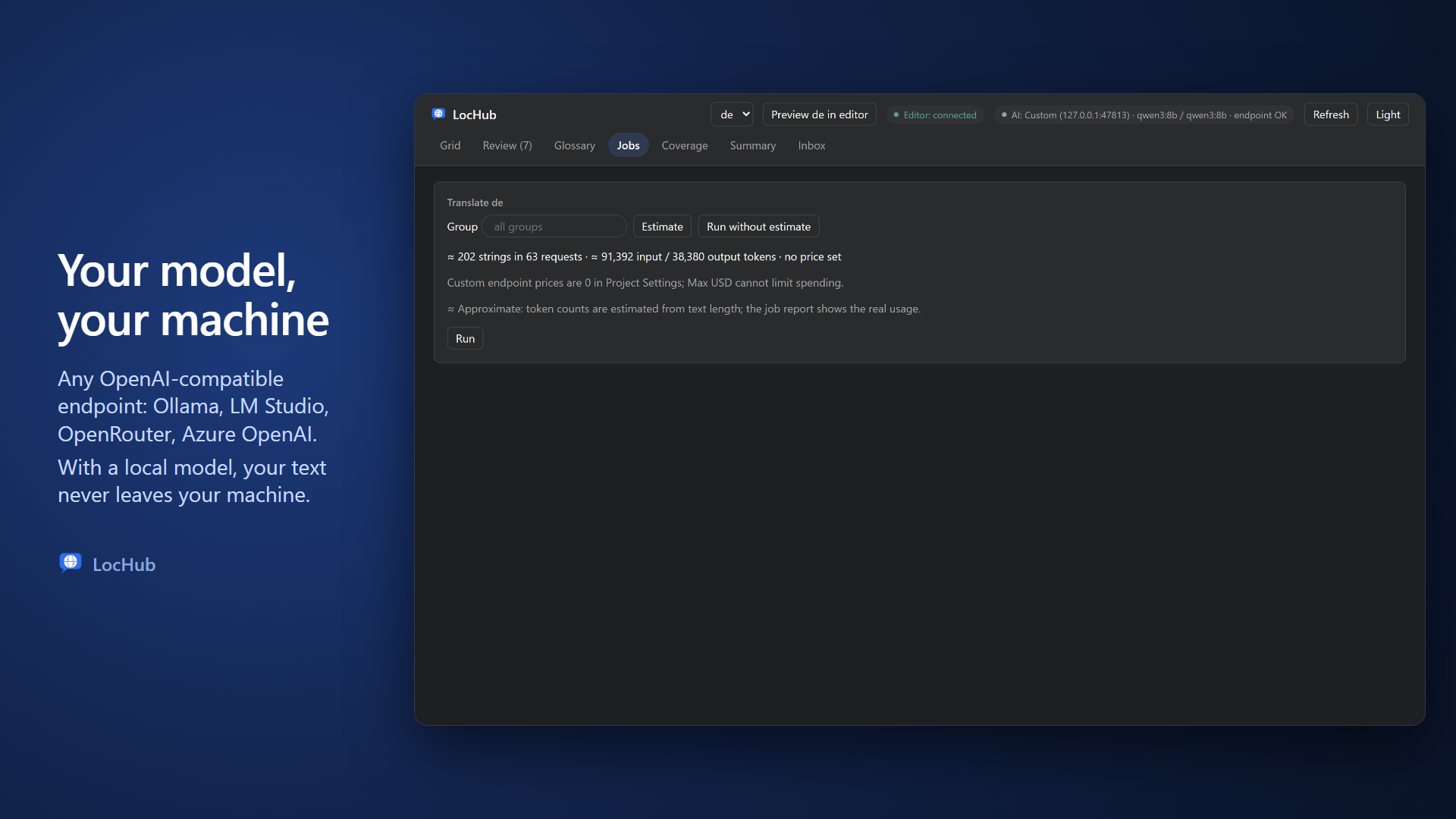
At the top of the LocHub tab, the AI pill should now say endpoint OK. If it says model missing, the model ID does not match what the server lists; unreachable means LocHub cannot reach the server at all.
3. Push, estimate, translate
- Tools > LocHub > Set Up Localization Target configures your project’s
Gametarget the way LocHub expects. - Gather text with Unreal’s own Localization Dashboard, then run Tools > LocHub > Push (Dry Run) and Push to send the gathered strings to LocHub.
- Open Tools > LocHub > Open LocHub, go to Jobs, pick a culture, click Estimate to see how many strings and requests the job needs, then Run.
If a request runs out of time on a slow model, LocHub does not just retry it: it splits the batch in two and sends the smaller halves, so the job still finishes, one smaller request at a time.
4. Review what the model got wrong
Open the Review tab. The queue puts the riskiest strings first, and every card is checked as you look at it:
- a hard issue — a broken format argument, a dropped rich-text tag, invalid syntax — blocks Approve and Save outright;
- a confirm issue — a lost plural modifier, a possibly missing argument — needs a human to look at it and approve it anyway, or fix it.
Fix the text in place, press A to approve, J/K to move, R to reject. Human edits are never overwritten by a later AI pass.
5. Pull it back into Unreal
Tools > LocHub > Pull writes the approved translations into your project’s .archive files and compiles
.locres. These are ordinary Unreal localization files, so nothing in your game depends on LocHub at runtime.
When to use a hosted model instead
A local model is a good first pass and keeps your text private. When you need fewer fixes per hundred strings, the same setup works with Anthropic, OpenAI, xAI, DeepSeek or Gemini under your own key — or a router such as OpenRouter through the same Custom endpoint — and the Estimate button then shows a dollar figure and a Max USD cap before you spend anything.
LocHub is source-available on GitHub and sold for commercial use on Fab. Full setup details: AI providers and keys.
Drafted by LocHub’s AI assistant; every step and setting is checked against the LocHub documentation.