DAMAGEBODY COLLISION
Body collision
What it does
Section titled “What it does”With Deform Collision on, a dented body’s collision takes the shape of its dents. A car pushed in by a crash is also pushed in for the other cars, the props and the pawns that hit it. Mass and inertia keep their values, so the car drives as before.
How it works
Section titled “How it works”Only the body’s own simple collision follows the dents: the boxes, convexes, spheres and capsules of the root’s physics shapes. A shape welded onto the body from another component keeps its own shape. For the profile and the lattice that the collision follows, see Core concepts.
- Boxes and convexes are cut into blocks where the dent bends them. The plugin cuts a shape along the lattice’s node planes wherever the lattice bends its surface further than Collision Block Tolerance from what its corners alone would give. Each block is a hull of its points, moved by the lattice.
- Spheres and capsules keep one hull of their surface points, moved by the lattice.
- Undented shapes stay as they are. A body with no dent keeps its own collision shapes.
The plugin rebuilds the collision when it has to. A rebuild starts once a lattice point on a shape has moved more than Collision Rebuild Threshold (2 cm) since the last build. Builds come at most once per Collision Rebuild Interval (0.5 s), so a dent that comes sooner waits for the rest of the dents and goes into the same build. The new hulls are swapped onto the live body, so it keeps its speed, its sleep state, its joints and its mass.
A repair puts the shared shapes back at once. It does not wait for the interval.
A heavy build does not have to finish in the frame of the hit. Collision Defer Frames is 0 or 1 (1 by default; a value above 1 reads as 1). At 1 the plugin computes the new hulls on a worker thread, and the body’s rebuild and cut are on the body before the next frame’s physics. If the worker has not finished by then, the game thread waits for it there. So the frame of the hit stays short, which matters on weaker machines, and the next frame can be the longer one on a slow machine. Until the hulls land, the dented body keeps the collision it had. A build asked for while another one runs starts when that one lands and takes its own frame. A torn part waits in its place, or keeps swinging on its hinge, until its cut is on the body, and then falls: a frame later, or two when another collision build was running. A torn part’s hull lands after that frame’s physics. Set the value to 0 to build everything in the frame of the hit. A device profile can set the same value with the console variable Crushform.Collision.DeferFrames.
Loose hinged parts follow their own dents too. Once a door or a hood comes off, its collision is one hull of its dented shape, when Dented Part Collision is on in the profile, or when the hinge overrides it, and Hinged Parts is on. See Hinged parts.
Two things must be on for the collision to follow the dents. Dents must be on in the profile, and the root of the body must have a physics body with simple shapes. Without a physics body the plugin does nothing and says nothing. Without simple shapes it logs a warning and the collision stays as it was.
Set it up
Section titled “Set it up”- In the Content Browser, choose Add > Miscellaneous > Data Asset, pick CFProfile, and name it. A profile tunes how the body dents. See Dents and the lattice for the rest of it. The sample car uses
DA_CF_Profile_Sedan. - Open the profile. In the Dents category, leave Dents on and leave Deform Collision on. Both are on by default.
- Open the vehicle’s Blueprint, select its Crushform Chaos Vehicle Adapter component, and set Deform Profile to your profile.
- Optional: adjust the collision values in Project Settings > Plugins > Crushform > Collision. The defaults are right for most bodies.
| Dents | ||
|---|---|---|
| Dents | ||
| Deform Collision | ||
| Hinged Parts | ||
| Dented Part Collision | ||
| Collision | ||
|---|---|---|
| Collision Rebuild Threshold | 2.0 | |
| Collision Rebuild Interval | 0.5 | |
| Collision Block Tolerance | 1.5 | |
| Max Collision Blocks | 96 | |
| Deform Collision | ||
| Collision Defer Frames | ||
Use it
Section titled “Use it”There is no Blueprint node, and no C++ call that changes the collision. The collision follows the dents on its own, and the switch is in the profile. To put the shapes back, use Repair on the deform component. On the server it clears the dents, and the collision goes straight with them. See Dents and the lattice. The damage that the collision follows is also what Damage zones and events reports.
Key settings
Section titled “Key settings”| Property | What it does | Default |
|---|---|---|
UCFProfile::bDeformCollision | Whether the body’s collision follows its dents. Mass and inertia keep their values. Edit condition: Dents on. | On |
UCFSettings::bDeformCollision | The same for the whole project. Off wins over every profile, and a torn part is not cut out of the body: it starts inside the collision and the solver pushes it out. Project Settings > Plugins > Crushform > Collision. | On |
UCFProfile::bDents | Whether hits and presses dent the body at all. Off: the collision never changes. | On |
UCFProfile::bDentedPartCollision | Whether a loose hinged part collides with its dent. Needs Deform Collision and Hinged Parts. | On |
UCFSettings::CollisionRebuildThreshold | How far a lattice point on a shape must move, cm, before the collision is built again. | 2 |
UCFSettings::CollisionRebuildInterval | Shortest pause between two builds of one body’s collision, s. | 0.5 |
UCFSettings::CollisionDeferFrames | Frames a heavy collision build may run on a worker before it must be on the body, 0 or 1. 0 builds it in the frame of the hit. | 1 |
UCFSettings::CollisionBlockTolerance | How far the lattice may bend a box or convex from what its corners give, cm, before it is cut into blocks. | 1.5 |
UCFSettings::MaxCollisionBlocks | Most collision blocks the boxes and convexes of one body are cut into. | 96 |
Check that it works
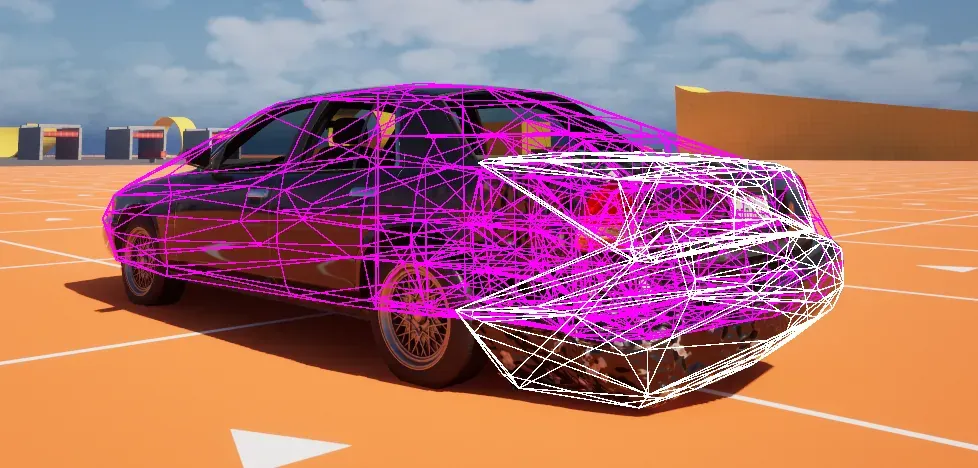
Section titled “Check that it works”In any build except Shipping, play in the editor. Crushform.DebugImpact never hits the car you drive, because the trace skips it. Drive up to a parked car, such as BP_VehicleAdvSedan2 on the Proving Ground map, to 3 to 5 m from its rear, and run Crushform.DebugImpact 20 BP_VehicleAdvSedan2. The name aims the hit, from where you stand, at the point of that car’s body nearest its middle; from 3 to 5 m behind it, that lands on the rear. Then run Crushform.ShowCollision 1. Magenta wireframes show the live collision of every damageable body, and the blocks of a dented body follow its dented shape. A part that is swinging or has come off its mount shows in white. Crushform.ShowCollision 0 turns the overlay off.
Run Crushform.RepairAll to repair the car. The collision goes back to its straight shapes at once.
Troubleshooting
Section titled “Troubleshooting”- The collision stays straight under a visible dent. Either Dents or Deform Collision is off in the profile, or Deform Collision is off in the project settings, or the root has no physics body (no warning), or the root’s physics body has no simple collision shape. In the last case the log warns that the root “has no simple collision shape, its collision does not follow the dents”. Add simple collision to the root body in its physics asset. To see what the plugin collides with, run
Crushform.ShowCollision 1: if the magenta wireframe stays straight under the dent, the collision is not following it. - The collision catches up a moment after the dent. This is by design. A build waits until a point has moved Collision Rebuild Threshold and until Collision Rebuild Interval has passed. Lower either value to rebuild more often, at the cost of more rebuilds. Once a build starts, at Collision Defer Frames 1 it is on the body before the next frame’s physics; 0 puts it on the body in the frame of the hit, at the cost of a longer frame.
- A physics step can still use the shapes from before the dent. With async physics (
UPhysicsSettings::bTickPhysicsAsync), a hit can reach the game thread after the next physics step has started, at 0 and 1 alike, when frames are no shorter than the physics step. During such a step a body keeps its shapes from before the dent. - A fold inside one lattice cell does not show in the collision. The collision blocks are no finer than a lattice cell. Raise the profile’s Resolution to give the lattice more nodes.
- Scaling the car at runtime breaks its collision. Changing a dented body’s scale at runtime is not supported. Scale the car before it dents.