GET STARTEDCORE CONCEPTS
Core concepts
Crushform is a few parts that work together: an adapter that puts the plugin on a vehicle, a lattice that bends the body, a profile that tunes the bending, materials that draw the result, and hosts that answer the questions only your game can answer. This page goes through them in that order.
The adapter
Section titled “The adapter”A vehicle gets the whole plugin from one component. On a Chaos wheeled vehicle, use UCFChaosVehicleAdapterComponent: it reads the wheels from the movement component. On any other actor, use UCFVehicleAdapterComponent and list its wheels. A trailer uses the generic adapter too. Its wheels turn with its motion, so a towed trailer raises dust without an engine.
The adapter creates the components below on every machine, under the names in the first column. Each one is switched by the flag in the third column of the table.
| Name | Class | Flag | What it does |
|---|---|---|---|
CF_Deform | UCFDeformComponent | Dirt and Dents | Dents and dirt on the body. |
CF_Glass | UCFGlassUnitsComponent | Glass | Cracks and breaks the glass panes. Needs Dirt and Dents, which finds the panes. |
CF_PropContact | UCFPropContactComponent | Breaks Props | Breaks the breakable props the vehicle drives into. |
CF_ImpactFeedback | UCFNetImpactFeedbackComponent | Impact Feedback | Impact sounds and effects, on every machine. |
CF_PartImpactFeedback | UCFPartImpactFeedbackComponent | Impact Feedback with Dirt and Dents | Sounds and effects of the hinged parts. |
CF_Tires | UCFTireComponent | Tires | Tyres deform on the wheel meshes: they squash under load and wrap round what they press onto. |
CF_RollingAudio | UCFRollingAudioComponent | Rolling Sound | The rolling sound of each wheel, from the surface under it. |
CF_RollingFX | UCFRollingFXComponent | Rolling FX | The rolling effect of each wheel, from the surface under it. |
CF_EngineAudio | UCFEngineAudioComponent | Engine Sound | The engine sound. The Engine Sound switch in the Crushform Engine settings must be on too. |
Deform, glass, prop contact and impact feedback replicate. Each is created under its fixed name on every machine, so the client’s copy stands for the server’s. Sound and effects run only where something is rendered, so they never run on a dedicated server.
Authority in UCFVehicleAdapterComponent::Authority picks which machine simulates the vehicle and judges its hits:
- Server: the server simulates the vehicle and accepts no hit reports from clients. This is the stock Chaos setup.
- Owning Client: the machine whose player controls the vehicle simulates it and reports its hits. The server does this while no player controls it. The server believes a reported hit only when it is no harder than the vehicle’s recent speed allows, plus Ram Allowance Mps, and that sum is then multiplied by up to about 2.2. The multiplier is headroom for a hit into a lighter body that gives way: such a hit takes more energy out of the vehicle than the same speed change into a wall would, so the server allows for it.
The lattice and the profile
Section titled “The lattice and the profile”When play begins, UCFDeformComponent spans a lattice of nodes over the body, in the space of its root component. Each node holds a displacement and a paint wear value. A hit pushes the nodes the way metal crushes: the dent runs back from the contact like an accordion, and it spreads across the hit. A physics contact on a deformed mesh becomes a hit on the machine that simulates the body. A sliding contact wears the paint.
The lattice bends the static meshes that are not instanced, and the skeletal meshes of the owner. Include Tags and Exclude Tags in the profile filter them by component tag. The lattice is fixed to the root at BeginPlay, so exclude every part that moves relative to the body, such as a door or the steering wheel. Such a part would bend in the pose it had at BeginPlay.
A hinged part, such as a door or a hood on a UCFHingeComponent, swings on its hinge once its dents pass the swing threshold. It comes off only when it is crushed hard enough.
The shape of the damage comes from a profile, a UCFProfile data asset. Create one and set it on the component, in the class defaults or between SpawnActorDeferred and FinishSpawning. Without a profile the component does nothing. The main settings are these:
- Resolution (
UCFProfile::Resolution): the lattice nodes on each axis. Every axis is a multiple of 4. The lattice shrinks to fit one atlas slot, and the asset’s validation reports an error, with the size the game would clamp it to, when it had to. - Min Delta V: the hit speed, in m/s, before the body dents. Softer hits leave it alone.
- Stiffness: the dent depth, in cm, per m/s above Min Delta V.
- Max Displacement (
UCFProfile::MaxDisplacement): the furthest any node moves, in cm. The body’s materials must use it as Max World Position Offset Displacement. - Stiffness Zones (
UCFProfile::StiffnessZones): boxes in the root’s space where the body is stiffer or softer than the rest, such as a soft crumple zone in front or a cabin that keeps its shape. Each zone has its own Stiffness.Crushform.ShowZones 1draws them. - Include Tags and Exclude Tags: the meshes that bend, as described above.
- Dents: when off, hits and crush presses never dent or scratch the body. Dirt still works.
- Deform Collision: the body’s collision follows its dents. Each box or convex shape is cut into blocks where a dent bends it. Mass and inertia keep their values.
- Hinged Parts: when off, hinged parts never swing or come off. They dent with the body like any other panel.
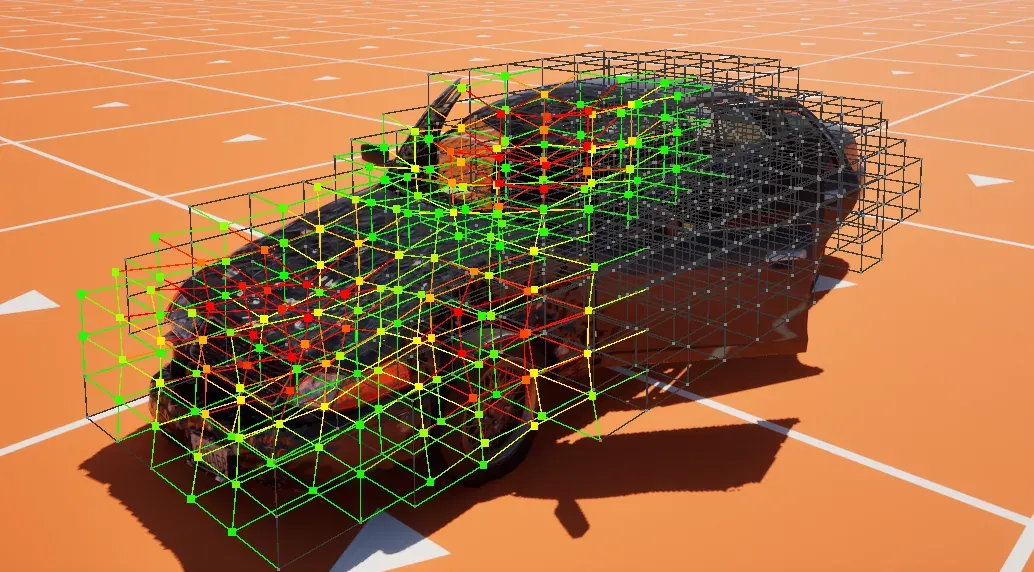
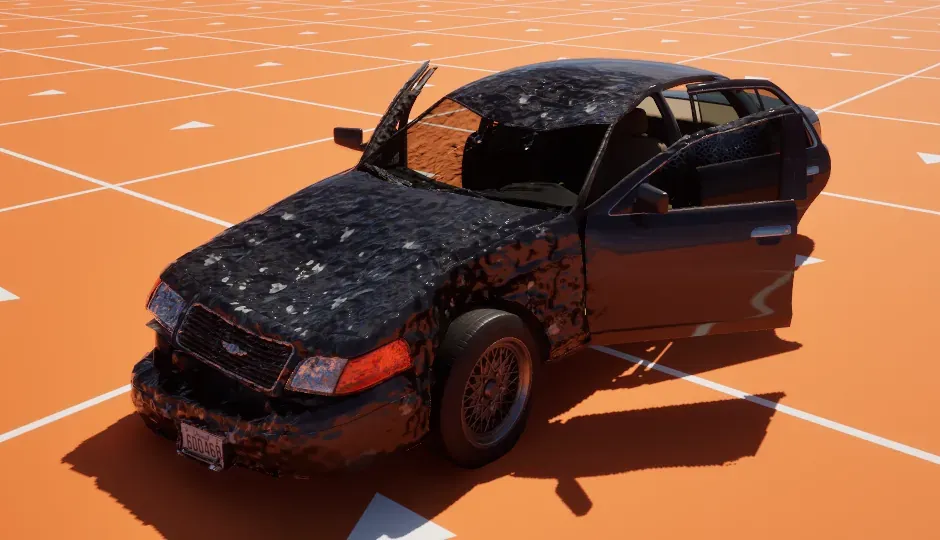
With Crushform.Debug 2 the lattice shows as nodes and the beams between them.
Materials draw the damage
Section titled “Materials draw the damage”The body’s damage is drawn by its materials. All damaged components share one atlas, RT_CF_LatticeAtlas (/Crushform/Atlas/RT_CF_LatticeAtlas), an RGBA8 render target of 1024 by 256 texels. By default it holds 128 slots of 256 by 8 texels. UCFRenderSubsystem gives each damaged component a slot and copies the component’s lattice into it. The material finds its slot through Custom Primitive Data. The plugin writes 18 floats from Custom Data Offset, which is 0 by default. Changing it rebuilds the material functions that bake it: save them, or run Crushform.RebakeOffsets in the editor.
Three material functions draw the body and the wheels:
MF_CF_Deformmoves vertices with World Position Offset and turns their normals. Where a dent shortened the metal, it also throws folds.MF_CF_Paintwears the paint and draws the scratch lines. It goes between your paint and Base Color, Roughness and Metallic, and its wear and scratch lines are fed fromMF_CF_Deform.MF_CF_WheelDirtdraws the dirt on the wheels.
In each material of a mesh that should bend, wire MF_CF_Deform into World Position Offset and Normal. Set Max World Position Offset Displacement to at least the profile’s Max Displacement plus the material’s fold amplitude, because the folds move vertices past the dents. A component with no damage has no slot and draws exactly as it would without the plugin. When the atlas runs out of slots, the damaged actors farthest from their players’ cameras draw undamaged until a slot frees up.
Dust, mud, snow and wet are drawn by MF_CF_Paint and MF_CF_WheelDirt, and glass cracks by MF_CF_GlassCrack. Each has a built-in look. In Project Settings › Plugins › Crushform › Look, you can point Body Dirt Look, Wheel Dirt Look and Glass Crack Look at a material function of your own.
Surfaces
Section titled “Surfaces”What a wheel does on the ground depends on the surface under it. A surface is a physical material. UCFSurfaces holds one row per physical material. It is named in Project Settings › Plugins › Crushform › Surfaces, and its default is /Crushform/Surfaces/DA_CF_Surfaces. Each row says what that ground does to a wheel on it:
- Dirt: what the surface gives the body and takes off it, per second at the reference speed.
- Rolling Sound: the rolling sound of the tyre on that surface.
- Rolling FX: the rolling effect, a Niagara system.
- Rolling FX Intensity Parameter: the float parameter of the effect that takes the intensity. When empty, the effect uses
UCFWheelSettings::FXIntensityParameter.
An empty field means none. A row with no Rolling Sound is silent, and it does not borrow the sound of the Default row. A wheel on a material with no row, or on no material, gets the Default row. Without a surfaces asset, no body gets dirty.
The shipped asset has a row for each of the seven physical materials, PM_CF_Asphalt, PM_CF_Dirt, PM_CF_Grass, PM_CF_Mud, PM_CF_Swamp, PM_CF_Snow and PM_CF_Water, and a Default row. To use one of them, set the Phys Material of the ground’s material under Physical Material. To use a surface of your own, add a row for its physical material.
Who decides the damage
Section titled “Who decides the damage”Each body has one machine that decides its damage, the one that simulates it. For a vehicle, that is set by Authority. For any other body, a host can answer which machine is the impact source (ICFDeformHost).
- The server holds the real lattice. It publishes the lattice in 4x4x4 chunks, one chunk per net update, the largest change first. Every client draws the chunks it receives.
- The client that simulates the body applies its own hits at once, as a prediction. It reports each hit to the server and keeps the hit until a chunk from the server confirms it or the server rejects it.
- The server rejects any report above the profile’s Max Plausible Delta V, the fastest hit or slide a client may report.
- A dedicated server simulates and judges the damage, but it draws nothing: no dirt, no sound and no effect.
A component asks its owner questions that only the game can answer: which machine simulates the body, which wheels touch the ground, which meshes are wheels, and where a tyre sits. Each group of questions is an interface. Implement it on the owner or on one of its components, in C++ or in Blueprint. A Blueprint event you leave untouched gives the answer of a body with no host.
| Interface | Asked by | Answers |
|---|---|---|
ICFDeformHost | UCFDeformComponent, the impact feedback | Which machine is the impact source, the ignored actors, whether a report is plausible, which meshes deform, the wheel meshes, the glass |
ICFWheelHost | the dirt layer, UCFRollingAudioComponent, UCFRollingFXComponent | One list of the frame’s wheels: point, radius, speeds, physical material, grounded or not |
ICFBreakerHost | UCFPropContactComponent | Whether this machine simulates the body, the contact body, the reporting route, the component a broken unit dents |
ICFTireHost | UCFTireComponent | The wheels, the offsets and pushes written back, the contact load ratios, the rig |
ICFTireViewer | the tyre budget | On a pawn: which vehicle the player rides in |
ICFEngineHost | UCFEngineAudioComponent | Whether the engine is off, cranking or running, its speed, idle and maximum speed, and its throttle |
A component finds its host in this order:
- The explicit host, set with
SetCrushformHostbefore BeginPlay. - The object registered for the owner in
UCFHostRegistry, a world subsystem. - The owner itself, when it implements the interface.
- No host.
The vehicle adapter registers itself as its owner’s host for the deform, wheel, breaker, tyre and engine interfaces. A deform component with an explicit host registers that host for the owner, so the owner’s other components find the same one. A host that does not implement the interface is refused with an error. A second host for the same actor and interface replaces the first, with a warning.
A C++ host is called directly. A Blueprint host runs script only for the events it implements as script. To put a vehicle of your own on the plugin, see Your own vehicle.
Project settings
Section titled “Project settings”The settings classes appear under Project Settings › Plugins, each under its display name:
| Section | Class | What is in it |
|---|---|---|
| Crushform | UCFSettings | Atlas (the render target and the slot sizes), Network (the limits on client reports), Contact (what counts as a new contact), Repair, Surfaces, the default profile, Dirt, Look, Loose Parts (how hinged parts swing and come off) and Collision (when a dented body’s collision is rebuilt). |
| Crushform Wheels | UCFWheelSettings | Rolling Sound (the switch, the attenuation, the sound class, the tuning and the cabin values) and Rolling FX (the switch, the intensity parameter and the FX tuning). |
| Crushform Tire | UCFTireSettings | Budget (which tyres deform, and the limits on them), Sleep (when a resting wheel stops tracing), Tracing (the channels a tyre’s ground trace ignores) and the default tyre profile. |
| Crushform Engine | UCFEngineSettings | Engine Sound: the switch, the default profile, the sound class, the priority and the cabin values. |
| Crushform Impact Feedback | UCFImpactFeedbackSettings | The Default Set of sounds and effects, and the Breakable Host switch. |
| Crushform Breakable | UCFBreakableSettings | The limits and collision of Debris, and the respawn of broken props. |
| Crushform Zone Editor | UCFEditorSettings | The zone presets of the zone editor (saved to DefaultEditor.ini). |
Check that it works
Section titled “Check that it works”In any build except Shipping, open the console with the tilde key and run these commands.
Crushform.Statsprints the atlas slots in use and the counters of every damageable actor in the world. It works in every build except Shipping.Crushform.Debug 2draws the lattice nodes that move the meshes, and the beams between them.Crushform.Debug 1draws only the damaged nodes. Recent hits show as blue spheres.Crushform.ShowZones 1draws the stiffness zones as boxes, from blue for soft through green to red for stiff.
Crushform.Debug and Crushform.ShowZones are cheats, so they work in every build except Shipping, and in the editor.