DAMAGEPAINT AND SCRATCHES
Paint and scratches
Paint wears where the body is dented and where it is scraped. The wear goes from paint to primer to bare metal, and a scrape also draws thin scratch lines along its direction. It all stays until the body is repaired. This page covers what the wear does and the settings that set it. The paint material itself is wired in Quick start, step 1.
What it does
Section titled “What it does”A scrape along a wall, at speed, leaves a stripe of primer and then bare metal, with thin scratch lines running along the slide. A dent wears the paint wherever its metal has moved at least 3 cm, and a deep dent cracks it a little more. A shove that only grinds along the panel, below 1.5 m/s, leaves the paint alone.
Wear builds up patch by patch, as on this car:
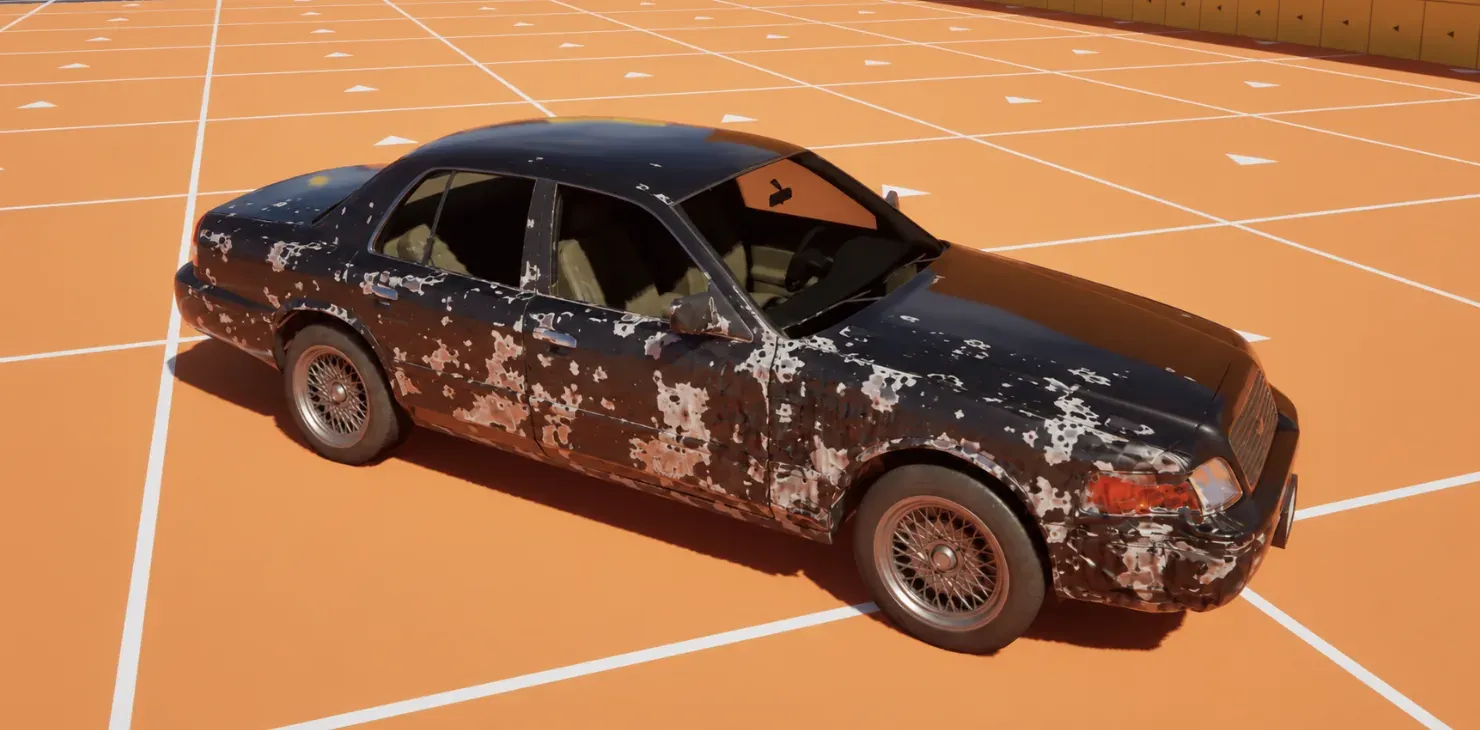
Only materials wired with MF_CF_Paint wear. Glass and interior parts that share the body’s mesh get MF_CF_Deform alone: they dent with the body and keep their own look. With Dents off, nothing dents or scratches, so the paint stays whole.
Scratch lines are thin parallel lines, lighter and rougher than the paint, and the deepest of them show the primer. They run along the direction the car slid. They show only when the scratch atlas is set up (see Set it up), and a slide slower than Min Scrape Speed draws none.
How it works
Section titled “How it works”- Dent wear. Each dent adds Dent Abrasion (
UCFProfile::DentAbrasion, 0.002) for every centimetre it moves a point’s metal past Min Abrasion Depth (UCFProfile::MinAbrasionDepth, 3 cm). The centimetre or two that a crash moves the body far from the hit leaves the paint whole. A 20 cm dent adds 0.034, for its 17 cm past the 3. A scrape wears the paint at any depth. The wear is clamped to Max Paint Wear (UCFProfile::MaxPaintWear, 0.2): the share of the paint a wreck can lose to primer and bare metal. 1 lets it all wear off. - Scrape wear. A contact that slides faster than Min Scrape Speed (
UCFProfile::MinScrapeSpeed, 1.5 m/s) adds Scrape Rate (UCFProfile::ScrapeRate, 0.05) for every metre it slides, within Scrape Radius (UCFProfile::ScrapeRadius, 30 cm). The reports come every Scrape Report Interval (0.1 s). A longer gap than Max Scrape Dt (0.25 s) counts only 0.25 s of slide. - Scratch lines. The same scrape adds Scratch Rate (
UCFProfile::ScratchRate, 0.05) of line cover for every metre it slides, to each point within Scrape Radius, up to Max Scratch (UCFProfile::MaxScratch, 0.033): the share of the paint a wreck can lose to lines. One pass over a point adds about Scratch Rate times twice the Scrape Radius in metres. With the defaults that is 0.05 × 0.6 = 0.03, so two passes reach the 0.033 cap. A Scratch Rate of 0 draws no lines. - One direction per point. A point keeps one direction for its lines, that of the dominant slide over it. A weaker slide adds cover but does not turn the lines. Where the directions of neighbouring points differ, because a slide turns or two slides cross, the lines of the directions in between fade into each other over a short stretch: two sets of lines show at once and trade places, not a seam where one set stops and the other starts.
- Deep dents crack. A dent deeper than 3 cm adds extra wear as it deepens, up to 0.06 at 25 cm deep and beyond. The 3 cm is fixed in the shader and does not follow Min Abrasion Depth.
- What the paint shows. Where the wear is high enough, the chip mask shows the primer colour, and at higher wear the bare metal colour. Roughness and metallic follow each layer. The primer defaults to a mid-dark grey (0.1, 0.105, 0.095) and the bare metal to a mid grey.
- The inputs.
MF_CF_Painthas fourteen inputs. Base Color, Roughness and Metallic take your paint, and Wear Depth and Scratch takeMF_CF_Deform. Primer Color is the colour under the paint, and Metal Color the colour of the bare metal. Scratch Tiling sets how often the chip mask repeats across the body, and Scratch Line Tiling how often the line texture repeats (0.02 per centimetre by default). Dust Color, Mud Color, Snow Color and Dirt Strength set the dirt look, and Dirt Strength scales all of it, dust, mud, snow and wet. Built-in Look chooses that built-in dirt; off, the worn paint goes through alone, for a look of your own.
- Repair. Repair clears the wear and the scratch lines with the dents. Wash does not touch them.
- Network. The lines travel with the dents to every machine, with no extra setting.
Set it up
Section titled “Set it up”- Make the profile as in Dents and the lattice, step 1 to 3. The paint settings live in the same profile.
- Open the profile and find the Paint category. The defaults are the values in the table below. Keep them to start, then change one at a time.
| Paint | ||
|---|---|---|
| Dent Abrasion | 0.002 | |
| Min Abrasion Depth | 3.0 | |
| Min Scrape Speed | 1.5 | |
| Scrape Rate | 0.05 | |
| Scratch Rate | 0.05 | |
| Scrape Radius | 30.0 | |
| Max Paint Wear | ||
| Max Scratch | ||
- Wire the paint material. In each material that should wear, put
MF_CF_Paintbetween your paint and Base Color, Roughness and Metallic, and feed its Wear Depth and Scratch fromMF_CF_Deform. Quick start step 1 lists the ten connections. - A painted material gets a scalar parameter,
CF_PaintWear, set to 1. An instance of that material that shares the body’s master, but should not wear, sets it to 0. The same scalar scales the scratch lines, so 0 turns them off too. - Check the scratch atlas. In Project Settings › Plugins › Crushform, the Atlas group holds Scratch Atlas, which points at
/Crushform/Atlas/RT_CF_ScratchAtlasby default. It must be an RG8 render target of the same size as the lattice atlas. When it is missing, or has another format or size, the lines stay invisible and the Output Log warns. The chips and the dents are not affected.
Use it
Section titled “Use it”The paint has no Blueprint call and no event. Wiring is editor work, so there is no graph. In editor code, a tool that wires many materials at once calls WireMaterial with the profile’s Max Displacement plus the default fold amplitude:
// Editor code. Routes the body material through the deform and paint functions.const float Bound = Profile->MaxDisplacement + UCFContentLibrary::GetDefaultFoldAmplitude();const bool bWired = UCFContentLibrary::WireMaterial(BodyMaterial, DeformFunction, PaintFunction, Bound);Pass a null PaintFunction for glass and interiors. The call then wires the deform only.
Key settings
Section titled “Key settings”| Property | What it does | Default |
|---|---|---|
UCFProfile::bDents | Off: no dent and no paint wear. | On |
UCFProfile::DentAbrasion | Paint wear added per centimetre of metal a dent moves. | 0.002 |
UCFProfile::MinAbrasionDepth | How far the metal must move, cm, before a dent starts to wear its paint; only the travel past it wears. Scrapes wear the paint at any depth. | 3 |
UCFProfile::MinScrapeSpeed | Sliding speed, m/s, below which contacts leave the paint alone. | 1.5 |
UCFProfile::ScrapeRate | Paint wear per metre slid, up to Max Paint Wear. | 0.05 |
UCFProfile::ScratchRate | Scratch line cover added per metre slid, up to Max Scratch. 0 draws no lines. | 0.05 |
UCFProfile::ScrapeRadius | Radius of a scrape, cm. | 30 |
UCFProfile::MaxPaintWear | Most paint wear any point takes, 0 to 1. 1 lets the paint wear through everywhere. | 0.2 |
UCFProfile::MaxScratch | Most scratch line cover any point takes, 0 to 1. The lines cover about 0.36 of the paint at most, so a higher value adds none. | 0.033 |
UCFSettings::ScratchAtlas | The RG8 render target that holds each point’s line cover and direction, of the lattice atlas’s size. Without a usable one there are no lines. | /Crushform/Atlas/RT_CF_ScratchAtlas |
UCFSettings::ScrapeReportInterval | Seconds between scrape reports. | 0.1 |
UCFSettings::MaxScrapeDt | Longest slide, in seconds, that one report counts. | 0.25 |
CF_PaintWear | Scalar on a painted material. An instance sets it to 0 to stop its wear. | 1 |
Check that it works
Section titled “Check that it works”- Open the proving ground in Play In Editor and drive the car along a wall at more than 1.5 m/s. The paint wears where the metal rubs, and thin scratch lines run along the direction you drove. More passes make the lines denser.
- Type
Crushform.Debug 2. The overlay colours a node by its displacement or by its wear, whichever is larger. The worn stripe shows as damaged nodes. - Type
Crushform.RepairAll. The wear and the scratch lines go with the dents.
Crushform.Debug and Crushform.RepairAll are cheats: they work in every build except Shipping, and in the editor.
Troubleshooting
Section titled “Troubleshooting”The paint never wears
Section titled “The paint never wears”Cause. One of four things. Dents is off in the profile, which stops all dents and scrapes. The material is not wired with MF_CF_Paint. The instance sets CF_PaintWear to 0. Or the car slides slower than Min Scrape Speed.
Fix. Check the four in that order. Then scrape faster than 1.5 m/s to confirm the wiring works.
A dent leaves the paint whole
Section titled “A dent leaves the paint whole”Cause. Dent Abrasion wears a point’s paint only for the travel of its metal past Min Abrasion Depth, 3 cm by default. A shallower dent bends the metal and leaves the paint on it. A scrape is not held to that depth.
Fix. Nothing, if you want a light crash to leave the paint whole. Lower Min Abrasion Depth to chip the paint in shallower dents: 0 wears it at any depth.
One scrape wears the paint through
Section titled “One scrape wears the paint through”Cause. Scrape Rate adds wear for every metre slid above Min Scrape Speed, within Scrape Radius. A long slide at speed adds up, and each report counts at most 0.25 s of it.
Fix. Lower Scrape Rate. Raise Min Scrape Speed if a shove along the panel should leave the paint alone, or raise Max Paint Wear only if a wreck should lose all its paint.
The paint wears but there are no scratch lines
Section titled “The paint wears but there are no scratch lines”Cause. The scrape reaches the body, so one of four things is left. Scratch Rate is 0 in the profile. The scratch atlas is missing, or is not an RG8 render target of the lattice atlas’s size: the Output Log then warns No Crushform scratch atlas (Project Settings > Plugins > Crushform); scratch lines stay invisible, or names the atlas and the size it must have. The material has no link from Scratch of MF_CF_Deform to Scratch of MF_CF_Paint. Or the instance sets CF_PaintWear to 0.
Fix. Raise Scratch Rate above 0. Set Scratch Atlas to /Crushform/Atlas/RT_CF_ScratchAtlas, or to an RG8 render target of your own with the lattice atlas’s size. Connect the two Scratch pins, or wire the material again with WireMaterial. Set CF_PaintWear back to 1.
The lines fade between two directions
Section titled “The lines fade between two directions”Cause. A point of the body keeps one direction for its lines. Where a slide turns, or two slides cross over one spot, the neighbouring points differ, and the lines of the directions in between fade into each other over a short stretch. There you see two sets of lines at once. This is expected: it replaces a seam where one set stops and the other starts.
Fix. Nothing, if a turn or a crossing should look like that. There is no setting for the length of the stretch. To get one set of lines, scrape in one direction, with a single straight slide. A lower Max Scratch makes the lines there fainter.
A glass pane or an interior shows no wear
Section titled “A glass pane or an interior shows no wear”Cause. It was wired without MF_CF_Paint. That is intended: glass and interiors dent with the body and keep their own look.
Fix. Nothing, if that is what you want. To make a part wear, wire it with MF_CF_Paint as in the step above.