SURFACESTYRE DEFORMATION
Tyre deformation
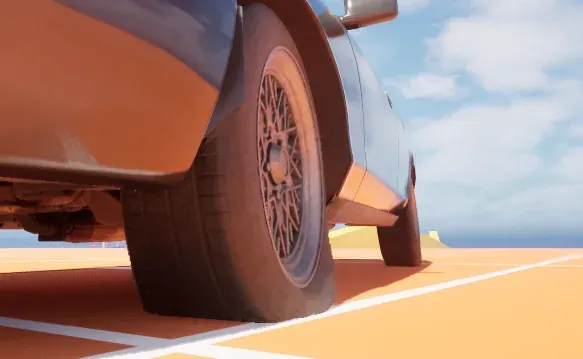
A tyre under load does not stay round. Where it meets the ground it bulges out at the sides and sinks in at the contact, and the harder the car leans on it the more it squashes. The plugin draws this on the wheel meshes of a vehicle, so the tyre looks loaded on any ground. A tyre pressed onto a round obstacle, such as a bar, a log or the rounded edge of a curb, wraps around it, and the wheel moves off the obstacle so that the rim stays outside it. This page covers the profile that shapes it, the budget that decides which tyres do it, and how to set both up.
What it does
Section titled “What it does”Each wheel of a vehicle gets a tyre deformer while the budget grants it one. The deformer traces the ground under the tyre and writes the contact into the wheel mesh, and the tyre material draws the bulge from those contacts. A tyre the budget does not grant gets no deformer and does not bulge. Your own vehicle’s tyres always deform, and the tyres of other vehicles deform while they are near the camera and within the limit of the budget.
How it works
Section titled “How it works”- Contacts. The tyre traces the ground on a fan of rays. Num Arc Samples rays cross the contact arc and Num Lateral Rows rows cross the tread. Each contact is written into the wheel mesh’s Custom Primitive Data, 32 floats, which
MF_CF_TireDeformreads.M_CF_TireDeformis the tyre material that uses it. - Depth. Max Deflection caps the deepest dent, in centimetres. A dent grows and fades over time, at Depth Grow Speed and Depth Fade Speed.
- Obstacles. Where the fan hits a round obstacle, the tyre reads its curvature in the wheel’s plane from three neighbouring hits, and the tyre material presses onto that circle with a rounded edge. A circle counts only when the normals of the three hits agree with it, so flat ground and the sharp corner of a curb keep the flat press. An obstacle thinner than Min Obstacle Radius presses as if it were that thick. Close hits merge into one contact only when their normals differ by no more than Merge Angle Deg; a low value lets a small round obstacle under a big tyre take all four contacts, so the ground loses its own.
- Push. The tyre dents until only Rubber Margin of rubber would be left between the obstacle and the rim. Deeper than that, it asks the host to move the whole wheel off the obstacle, by at most Max Push, and dents by what is left. The push goes to the host as
FCFTireWheelOffset::PushCmwhen the host accepts it (FCFTireWheelDesc::bAcceptsPush). Both adapters accept it. A Blueprint that overrides Set Crushform Tire Wheel Offsets places the wheels itself: no push is computed then, the tyre dents as it would without one, down to Max Deflection, and a rim may enter the obstacle. The rim radius comes from theRimRadiusparameter of the tyre material, or from Rim Radius Override in the profile. A wheel with neither is never pushed. - Load. The vehicle reports each tyre’s contact force over its nominal load. The tyre’s load factor moves toward
1 + Load Sensitivity * (ratio - 1), kept between 0 and Max Load Factor. A heavy corner squashes the tyre further. A resting tyre is squashed by Resting Deflection, a fraction of its radius. - Budget. The Scope setting says which tyres deform.
RigOnlylets only the viewer’s own vehicle deform.Budgeted, the default, adds the other vehicles’ tyres within the radius, on screen first and nearest first, up to Max Wheels wheels.Unlimitedgives every tyre full detail with no budget. The viewer’s rig, its vehicle and anything coupled to it, always deforms, even above the cap. The pawn says which vehicle it rides in throughICFTireViewer. The budget’s values are project settings, and each has a console variable that overrides it; see Project settings and Performance. - Detail. A tyre farther than Lod Distance 1 traces a thinner fan, and beyond Lod Distance 2 the thinnest fan against simple collision.
- Sleep. A wheel that has settled and stays within Sleep Distance and Sleep Angle Deg of its resting pose can fall asleep: it stops tracing until its pose changes. A negative Sleep Distance never lets a wheel sleep.
- Dedicated server. A dedicated server draws no tyres, so the tyre component stays idle there.
Set it up
Section titled “Set it up”- In the Content Browser, choose Add > Miscellaneous > Data Asset, pick the class CFTire Profile and name the asset DA_MyVehicle_TireProfile. The defaults are a good start: 13 arc samples, 3 lateral rows and a maximum deflection of 14 cm.
- On the vehicle’s adapter component, set Tire Profile to the new profile, and tick Tires. With Tire Profile empty, the project’s default tyre profile is used,
/Crushform/Presets/DA_CF_DefaultTireProfile. - Give the tyre meshes a material that uses
MF_CF_TireDeform. The easiest start is a copy ofM_CF_TireDeform, with your own colours. Set itsRimRadiusparameter to the rim’s radius in mesh units, so that the wheel can be pushed off an obstacle before the rim enters it. Or set Rim Radius Override, in centimetres, in the profile. - In Project Settings > Plugins > Crushform Tire, check Scope under Budget. It is
Budgetedby default. Add any object channels the tyre trace should ignore under Tracing. The other Budget values and the Sleep thresholds are there too; see Project settings.
Use it
Section titled “Use it”Blueprint reaches the tyre component through the adapter’s Get Tires getter. The component has no Blueprint functions of its own, so the graph below works through the getter. When the custom event CheckTyres fires, it checks that the vehicle has a tyre component and prints the answer, which is a quick test before a tuning script touches the tyres. The Blueprint work for the tyres themselves is the adapter’s own events: Build Tire Wheels lists the wheels and Build Load Ratios gives each wheel’s load.
From C++, set the profile of the tyre component. The calls need the CrushformVehicle module (the adapter, CFVehicleAdapterComponent.h) and the CrushformTire module (CFTireComponent.h), which you add to PublicDependencyModuleNames in your module’s Build.cs. A profile set after play has started also joins the component to the budget.
UCFTireComponent* Tires = Adapter->GetTires();Tires->SetProfile(MyTireProfile);A pawn that can sit in a vehicle implements ICFTireViewer, from CFTireViewer.h of the CrushformTire module, and returns the vehicle it rides in, so that the budget keeps that vehicle’s tyres deformed.
AActor* GetCrushformTireViewedHost_Implementation() const override;Key settings
Section titled “Key settings”| Property | What it does | Default |
|---|---|---|
UCFTireProfile::TraceChannel | The channel the tyre traces the ground on. | ECC_WorldStatic |
UCFTireProfile::NumArcSamples | Rays across the contact arc. | 13 |
UCFTireProfile::NumLateralRows | Rows of rays across the tread. | 3 |
UCFTireProfile::MaxDeflection | The deepest dent, in centimetres. | 14 |
UCFTireProfile::RestingDeflection | How far a resting tyre is squashed, as a fraction of its radius. | 0.05 |
UCFTireProfile::LoadSensitivity | How much the load changes the squash. | 1 |
UCFTireProfile::MaxLoadFactor | The most the load factor can reach. | 2.5 |
UCFTireProfile::MergeAngleDeg | Close contacts merge into one only when their normals differ by no more than this, in degrees. A low value lets a small round obstacle take all four contacts, so the ground loses its own. | 45 |
UCFTireProfile::MinObstacleRadius | The smallest radius, in cm, a round obstacle’s curvature is read as. A thinner one, such as a pipe, shapes the dent as if it were this thick. | 3 |
UCFTireProfile::RimRadiusOverride | The rim radius, in cm. 0 reads the RimRadius parameter of the tyre material. | 0 |
UCFTireProfile::RubberMargin | The rubber kept between an obstacle and the rim, in cm, once the wheel is pushed off it. | 2 |
UCFTireProfile::MaxPush | The farthest, in cm, the whole wheel is shifted off an obstacle. Past it the rim may enter the obstacle. | 10 |
UCFTireSettings::Scope | Which tyres deform: the viewer’s rig only, the rig and the budget, or every tyre. | Budgeted |
UCFTireSettings::IgnoredObjectChannels | Object channels the ground trace ignores, on top of the tyre’s own. | Empty |
UCFTireSettings::DefaultProfile | The profile of a tyre that names none. | /Crushform/Presets/DA_CF_DefaultTireProfile |
UCFSettings::TireCustomDataOffset | The first Custom Primitive Data index of the tyre contacts. | 0 |
UCFTireSettings::bEnabled | When on, the tyres deform; when off, every tyre relaxes back to round. Console override: Crushform.Tire.Enable. | On |
UCFTireSettings::MaxWheels | Tyres that may deform at once. Console override: Crushform.Tire.MaxWheels. | 30 |
UCFTireSettings::Radius | Distance from the camera, in centimetres, within which other tyres may deform. Console override: Crushform.Tire.Radius. | 4000 |
UCFTireSettings::LodDistance1 | Distance from the camera, in centimetres, past which a tyre traces a thinner ray fan. Console override: Crushform.Tire.LodDistance1. | 1500 |
UCFTireSettings::LodDistance2 | Distance from the camera, in centimetres, past which a tyre traces the thinnest fan against simple collision. Console override: Crushform.Tire.LodDistance2. | 3000 |
UCFTireSettings::Hysteresis | How far a granted tyre’s boundaries widen, so that a tyre on a boundary does not flicker. Read within 0 to 0.9. Console override: Crushform.Tire.Hysteresis. | 0.15 |
UCFTireSettings::UpdateInterval | Seconds between two budget passes. Console override: Crushform.Tire.UpdateInterval. | 0.25 |
UCFTireSettings::OnScreenTolerance | Seconds after it was last drawn that a wheel still ranks as on screen. Console override: Crushform.Tire.OnScreenTolerance. | 0.5 |
UCFTireSettings::SleepDistance | Distance from the resting pose, in centimetres, within which a tyre may fall asleep. A negative value never lets it sleep. | 1 |
UCFTireSettings::SleepAngleDeg | Angle from the resting pose, in degrees, within which a tyre may fall asleep. | 0.5 |
Check that it works
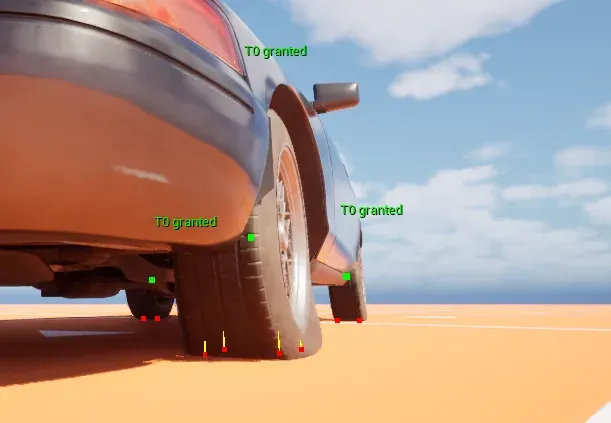
Section titled “Check that it works”Open the console and run Crushform.Tire.Debug 2. Level 1 prints the tyre counts on screen. Level 2 also draws, for each tyre, a label with its detail tier and grant state, such as T0 granted (tier 0 is the finest), a green point at the hub (blue while the tyre sleeps), and at each contact with the ground a red point with a yellow line along the contact normal. Then play Lvl_ProvingGround, drive the sedan over the bumps and land it off a ramp. The tyres bulge where they touch the ground, and the labels and points show on the tyres while they do. The debug panel’s Tyres row shows Off, Counts or Rays and does the same. Both are available in every build except Shipping. To see the wrap, press a tyre onto a round obstacle in a level of your own, such as a bar or a log: the tread wraps around it, and the wheel moves off it so that the rim stays outside.
Troubleshooting
Section titled “Troubleshooting”The tyres stay round
Section titled “The tyres stay round”Cause. A tyre component with no profile does nothing. The vehicle’s tyres stay round, and the log says so only at Verbose level. Enabled off in Crushform Tire, or Crushform.Tire.Enable 0 from the console, relaxes every tyre back to round. A host that does not implement ICFTireHost gives the same result and logs a warning:
%s: the host %s does not implement ICFTireHost, its tyres stay roundFix. Set Tire Profile on the adapter, or the Default Profile in Crushform Tire, and turn Enabled on in Crushform Tire (a console Crushform.Tire.Enable 0 still overrides it for the session). Check that the vehicle is a host: the adapter is one, and a custom actor must implement ICFTireHost.
Tyres far from the camera stay round
Section titled “Tyres far from the camera stay round”Cause. Budgeted grants a tyre only inside Radius, and only up to Max Wheels tyres in all. Your own vehicle is always granted, but the other vehicles share what is left.
Fix. Raise Radius or Max Wheels in Project Settings › Plugins › Crushform Tire (Crushform.Tire.Radius and Crushform.Tire.MaxWheels override them for a session), or set Scope to Unlimited to give every tyre full detail. Check the budget with Crushform.Tire.Debug 1.
The rim enters an obstacle
Section titled “The rim enters an obstacle”Cause. The wheel is not pushed off the obstacle. This happens when the wheel has no rim radius, because neither the tyre material’s RimRadius nor Rim Radius Override in the profile is set; when its host does not accept the push, as with a Blueprint that overrides Set Crushform Tire Wheel Offsets; or when the obstacle is deeper than Max Push allows.
Fix. Set RimRadius on the tyre material, or Rim Radius Override in the profile. On a host of your own, apply PushCm in SetCrushformTireWheelOffsets and set bAcceptsPush; see Host interfaces. Raise Max Push if the obstacle is deeper than the wheel may be pushed.
The tyres do not deform on a dedicated server
Section titled “The tyres do not deform on a dedicated server”Cause. A dedicated server draws no tyres. The component stays idle, and it logs that at Verbose level.
Fix. Test the tyres on a client or on a listen server.
The tyre contacts are not written
Section titled “The tyre contacts are not written”Cause. The tyre block is 32 floats, from Tire Custom Data Offset, which accepts 0 to 4. It must end before the wheel’s dirt block at Wheel Custom Data Offset, which is 34 by default. Above 2 the block runs into that dirt block, and the log says so once:
%s: TireCustomDataOffset %d does not fit the primitive clear of WheelCustomDataOffset %d, tyre contacts are not writtenFix. Set Tire Custom Data Offset back to 0, its default, which uses indices 0 to 31. The editor rebuilds the material functions that depend on it when the value changes.