DAMAGEGLASS
Glass
What it does
Section titled “What it does”Each glass pane of a Crushform body can crack, break and fall apart into shards. A hit near a window cracks it, a harder hit breaks it, and a body that dents around a pane can crack it too. The cracks stay on the pane until the body is repaired.
How it works
Section titled “How it works”A pane is a static mesh of the body, a UCFGlassComponent. It has no collision of its own. A shot or a thrown rock hits the body’s collision at the window, and Crushform matches the hit to the pane it reaches, within Hit Reach Cm (UCFGlassDefinition::HitReachCm, 15 cm in a new definition).
Every pane is one unit with three levels: intact, cracked and broken. The panes are numbered by their names, so every machine agrees which pane is which.
Three things can crack a pane. The pane’s definition sets the threshold for each:
- A hit. The speed change of a hit near the pane cracks it from Crack Delta V (
UCFGlassDefinition::CrackDeltaV) and breaks it from Break Delta V (UCFGlassDefinition::BreakDeltaV). A hit below the crack threshold does nothing to the glass. - The frame. The body bends around the pane as it dents (Dents and the lattice explains the dents). The largest displacement of a node inside the pane’s box cracks the pane at Frame Crack Displacement Cm. The mean displacement of those nodes breaks it at Frame Break Displacement Cm.
- A link. A part of the body, such as the hood in front of a windscreen (Hinged parts explains the hinged ones), can crack the pane through the pane’s Crush Link Box (
UCFGlassComponent::CrushLinkBox). The deepest node in that box cracks the pane at the edge nearest it, and the mean breaks it.
The frame and the link judge the glass only when the body dents. So glass needs Dirt and Dents on the vehicle’s adapter. The adapter finds the panes through it. For the adapter and the lattice, see Core concepts.
Cracks before a break. Set Cracks Before Break (UCFGlassDefinition::CracksBeforeBreak) to break a pane after that many cracks from hits. Zero means a pane never breaks by count. Only hits count, not the body’s frame, so a dent that stays does not break a pane by age.
Crack look. Each pane keeps at most four cracks. A crack’s radius grows with the strength of the hit, between Min Crack Radius Cm and Max Crack Radius Cm. Crack Style sets the pattern: web, hole or net.
Outside hits. A bullet or a thrown rock cracks a pane only when Takes Point Damage (UCFGlassDefinition::bTakesPointDamage) is on. The definition’s Hit Responses table then decides which level each kind of hit reaches. A kind with no row in the table does nothing (UCFBreakableDefinition::HitResponses).
Breaking. A broken pane is hidden and falls apart into shards. The pane is covered with square tiles, the ones nearest the hit first. Each tile is Shard Tile Cm across and breaks into Shards Per Tile shards. At most Max Shard Tiles tiles turn into shards, so the shards cover at most that many tiles of the pane, and the rest of the pane just vanishes: five 50 cm tiles cover 1.25 m², as in the laminated preset. Each tile is turned about the pane’s outward axis by a random angle, so the pieces of two tiles do not line up. Shard Shape sets the pieces: granules, small chunks as in tempered glass, or slabs, flat pieces as in laminated glass that crumbles without flying out. Each shard is one of the shard meshes, chosen at random and scaled to the shard’s size. The plugin ships six irregular polygon slabs, SM_CF_GlassShard_01 to SM_CF_GlassShard_06, drawn with M_CF_GlassShard, clear glass with brighter edges. Each broken pane throws its shards as particles of one Niagara system, described under Shard systems below.
Who draws. The server judges the glass and replicates the cracks, and every machine that draws them shows them. A dedicated server judges the panes but draws nothing and loads no shard system. A repair puts every pane back whole and drops its cracks.
Set it up
Section titled “Set it up”- Open your vehicle’s Blueprint, for example a copy of
BP_VehicleAdvSedanin your own project. Select its Crushform Chaos Vehicle Adapter component. Check that Dirt and Dents and Glass are on. Both are on by default. - Make a glass definition. In the Content Browser, choose Add > Miscellaneous > Data Asset, pick CFGlass Definition, and name it. You can also duplicate one of the shipped presets from Plugins › Crushform Content › Presets:
DA_CF_GlassLaminatedorDA_CF_GlassTempered. - Check the definition for shards. A definition with no shards warns that a broken pane will vanish without any. Build them by calling Build Glass Shards (
UCFContentLibrary::BuildGlassShards, in the Crushform|Content category) from an Editor Utility Blueprint or from Python. The call takes the definition and a list of shard meshes; the plugin ships six, built by Build Glass Shard Mesh (UCFContentLibrary::BuildGlassShardMesh).
| Glass | ||
|---|---|---|
| Crushform Hits | ||
| Crack Delta V | 5.0 | |
| Break Delta V | 14.0 | |
| Hit Reach Cm | 20.0 | |
| Frame Crack Displacement Cm | 4.0 | |
| Frame Break Displacement Cm | 12.0 | |
| Link Crack Displacement Cm | 30.0 | |
| Link Break Displacement Cm | 15.0 | |
| Cracks Before Break | ||
| Look | ||
| Crack Style | ||
| Min Crack Radius Cm | 10.0 | |
| Max Crack Radius Cm | 45.0 | |
| Crack Merge Cm | 12.0 | |
| Shards | ||
| Shard Shape | ||
| Shard Tile Cm | 50.0 | |
| Shards Per Tile | 12 | |
| Shard Min Size Cm | 3.0 | |
| Shard Max Size Cm | 9.0 | |
| Shard Thickness Cm | 0.6 | |
| Max Shard Tiles | 5 | |
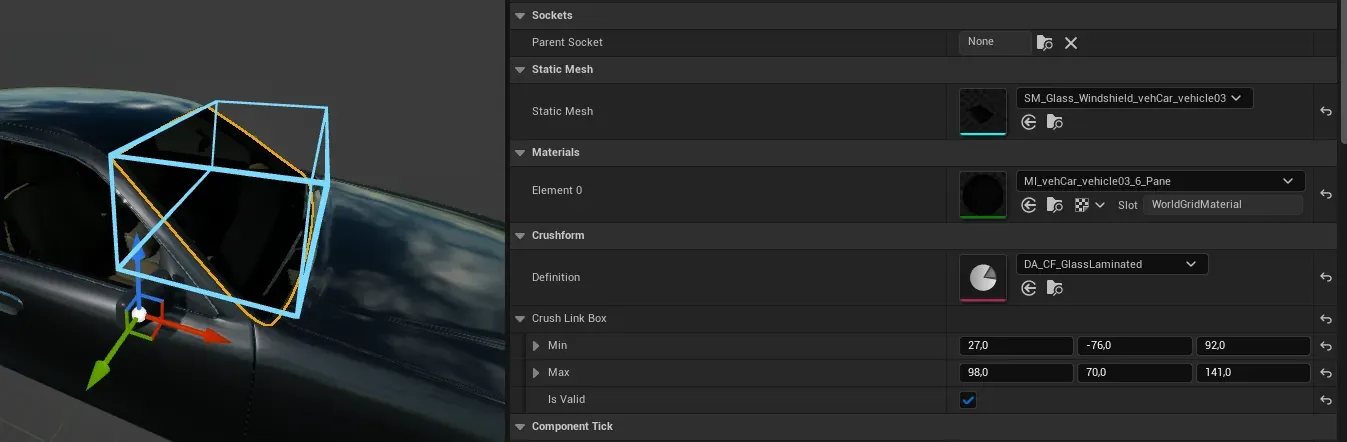
- Add a pane for each window. In the vehicle’s Blueprint, choose Add › CFGlass, in the Crushform group. Set its Static Mesh to the window’s mesh and its Definition to your glass definition. Attach the pane under the body or under the hinged part it sits on.
- Open the window’s static mesh and turn on Allow CPU Access. Without it, the shards of a curved or sloped window land on a flat plane, because the plugin cannot read the window’s shape.
- Optional: set the pane’s Crush Link Box, for example to the area around the windshield, as on the sedan. The hood is another choice for a pane the hood folds into. Tick Is Valid on Crush Link Box, then set its Min and Max in the root’s space, in cm. A box that is not valid links nothing. Select the pane in the Blueprint editor to see the box drawn in the viewport. It is drawn only in the Blueprint editor, not in the level or in PIE.
Use it
Section titled “Use it”Get the glass units from the vehicle’s adapter with Get Glass. It returns nothing unless Glass and Dirt and Dents are on. Then bind On Unit Level Changed (UCFBreakableUnitsComponent::OnUnitLevelChanged) to a custom event. The event passes Units, UnitIndex, Level and PreviousLevel.
The event fires on every machine each time a pane’s level changes. That includes a player who joins late and gets the state of the panes already cracked or broken. So check Level in your handler rather than assuming the event means a break. Do not start one-shot effects from it. To read how dented each side of the body is, use Damage zones and events.
From C++, crack or break the pane nearest a point. This works on the authority only.
#include "CFScriptedHits.h"
// Authority only: crack the pane nearest WorldPoint, within 50 cm of it.const bool bCracked = CFScriptedHits::HitPaneNear(*Deform, WorldPoint, 50.0f, /*bBreak=*/false);
Deform is the body’s UCFDeformComponent, and WorldPoint is an FVector in the world. Set bBreak to true to break the pane instead. The function returns false when no pane is that close or nothing changed.
Key settings
Section titled “Key settings”| Property | What it does | Default (new definition) |
|---|---|---|
UCFGlassDefinition::CrackDeltaV | Speed change of a hit near the pane, in m/s, from which the pane cracks. | 5 |
UCFGlassDefinition::BreakDeltaV | Speed change, in m/s, from which a hit breaks the pane. Must be above Crack Delta V. | 12 |
UCFGlassDefinition::HitReachCm | How far the pane’s box is widened when a hit is matched to it, cm. | 15 |
UCFGlassDefinition::FrameCrackDisplacementCm | Largest node displacement in the pane’s box, cm, from which the frame cracks the pane. | 4 |
UCFGlassDefinition::FrameBreakDisplacementCm | Mean node displacement in the pane’s box, cm, from which the frame breaks it. | 10 |
UCFGlassDefinition::LinkCrackDisplacementCm | Largest node displacement in the Crush Link Box, cm, from which a linked part cracks the pane. | 25 |
UCFGlassDefinition::LinkBreakDisplacementCm | Mean node displacement in the Crush Link Box, cm, from which a linked part breaks the pane. | 15 |
UCFGlassDefinition::CracksBeforeBreak | Cracks from hits after which the pane breaks. Zero: never by count. | 0 |
UCFGlassDefinition::CrackStyle | The crack pattern a hit leaves: web, hole or net. | Web |
UCFGlassDefinition::MinCrackRadiusCm | Radius of the crack the weakest hit leaves, cm. | 8 |
UCFGlassDefinition::MaxCrackRadiusCm | Radius of the crack the strongest hit leaves, cm. | 45 |
UCFGlassDefinition::ShardShape | What a broken pane falls apart into: granules or slabs. | Granules |
UCFGlassDefinition::ShardTileCm | Edge, cm, of the square tile of the pane that Shards Per Tile shards are made for. At least 2. | 30 |
UCFGlassDefinition::ShardsPerTile | Shards a tile of the pane breaks into. | 8 |
UCFGlassDefinition::ShardMinSizeCm | Smallest edge of a shard, cm. | 2 |
UCFGlassDefinition::ShardMaxSizeCm | Largest edge of a shard, cm. | 4 |
UCFGlassDefinition::ShardThicknessCm | Thickness of a shard, cm. Slabs only. | 0.5 |
UCFGlassDefinition::MaxShardTiles | Most tiles of one pane that turn into shards when it breaks. | 6 |
UCFGlassDefinition::ShardSystem | The Niagara system that throws this glass’s shards. None: the project’s Default Glass Shard System. | None |
UCFGlassDefinition::bTakesPointDamage | Whether a bullet or a thrown rock can crack and break the pane. | Off |
UCFGlassComponent::CrushLinkBox | The part of the body whose crush also cracks this pane. An empty box links nothing. | Empty |
The values of a new definition are shown above. The shipped presets differ. DA_CF_GlassLaminated, which the sedan uses, cracks at 5 m/s, breaks at 14 m/s and reaches 20 cm. Its tiles are 50 cm, with 12 shards of 3 to 9 cm each, on at most 5 tiles. DA_CF_GlassTempered cracks at 6 m/s and breaks at 9 m/s. Its tiles are 30 cm, with 16 shards of 1 to 2.5 cm each, on at most 4 tiles.
Shard systems
Section titled “Shard systems”Each broken pane throws its shards through one Niagara system, taken from a pool. The system returns to the pool when it finishes, when the pane is repaired, and when play ends. A pane farther than UCFBreakableSettings::DebrisMaxSpawnDistanceCm (10000 cm) from the local camera throws no shards.
A definition names its own system in Shard System (UCFGlassDefinition::ShardSystem). A definition with no Shard System uses the project’s Default Glass Shard System, in Project Settings › Plugins › Crushform, under Glass. The plugin sets it to NS_CF_GlassShards. The default system loads in the background when play begins. Until it is in memory, a break throws no shards, and the game never waits for it in the frame of a break. A definition’s own system loads with the definition, so it has no such gap.
Mesh slots. Each shard draws its mesh from a mesh slot, a static mesh user parameter: User.CF_ShardMesh0, User.CF_ShardMesh1 and so on. Slot 0 takes the definition’s first distinct shard mesh, slot 1 the second, in the order the meshes first appear among the pieces. The default system has six slots, CF_ShardMesh0 to CF_ShardMesh5. A seventh distinct mesh reuses slot 0, an eighth reuses slot 1, and so on. A definition’s own system needs a slot for each distinct mesh. The editor warns when a definition with no Shard System has more than six distinct shard meshes. A slot the system does not have draws no mesh.
Shard sound. When shards hit something, the pane plays its shard impact sound for the fastest of them, at most once every 0.25 s (UCFBreakableSettings::DebrisImpactCooldownSeconds). A shard whose impact is under UCFBreakableSettings::DebrisMinImpulsePerKg plays nothing. A custom system needs the Export data interface described below to make this sound.
What a custom system must expose. Give the system these user parameters under these names. The plugin sets every one of them on each spawn, so a pooled system reused for another pane keeps none of the last pane’s values. A parameter the system does not have is ignored.
| Parameter | Type | Meaning | Units |
|---|---|---|---|
User.CF_ShardPositions | Position array | Each shard’s centre, in world space. | cm |
User.CF_ShardRotations | Quaternion array | Each shard’s rotation, in world space. | None |
User.CF_ShardVelocities | Vector array | Each shard’s starting linear velocity. | cm/s |
User.CF_ShardAngularVelocities | Vector array | Each shard’s starting spin about the world axes. | deg/s |
User.CF_ShardScales | Vector array | Each shard’s scale. It multiplies the size of the shard’s mesh. | None |
User.CF_ShardMeshIndices | Integer array | The mesh slot each shard draws its mesh from. | Slot number |
User.CF_ShardCount | Integer | Number of shards in the spawn. | None |
User.CF_ShardLifetime | Float | Seconds a shard lives at most. | s |
User.CF_ShardRestSeconds | Float | Seconds a resting shard lies still before it sinks. | s |
User.CF_ShardSinkSeconds | Float | Seconds a shard takes to sink away. | s |
User.CF_ShardCollisionDelay | Float | Seconds after spawn before the system collides a shard. The plugin sets 0.1. | s |
User.CF_ShardCallback | Object | The callback that the system’s Export data interface reports each shard hit to. | None |
User.CF_ShardMesh0, User.CF_ShardMesh1, … | Static Mesh | The mesh of slot 0, slot 1 and so on. | None |
The shard sound also needs an Export data interface that reports each particle’s position and velocity to User.CF_ShardCallback. Without it the shards still fly, and only their sound is lost.
Three console variables set how much glass throws and when:
Crushform.Glass.ShardScale(1) is the share of a broken pane’s shards that are thrown, from 0 to 1. 0 throws none, and the pane still breaks.Crushform.Glass.MaxLiveShards(512) is the most shards of broken panes alive at once. 0 is no cap. Past the cap, the oldest broken panes’ shards are released first, and one break’s own shards beyond the cap are cut.Crushform.Glass.ShardSystemsPerFrame(1) is the shard systems started in one frame, and 0 is no limit. Panes that break together throw their shards a frame or a few apart, so that the frame of the crash does not start them all.
The Performance page says what each one costs.
Check that it works
Section titled “Check that it works”In any build except Shipping, play in the editor. Crushform.DebugImpact never hits the car you drive, because the trace skips it. Drive up to a parked car, such as BP_VehicleAdvSedan2 on the Proving Ground map, and aim the centre of the screen at its windshield. Run Crushform.DebugImpact 8. The speed change is 8 m/s. The window should show a crack, and you should hear the crack sound. Set crushform.Impact.LogHits 1 first to log each hit’s point and intensity.
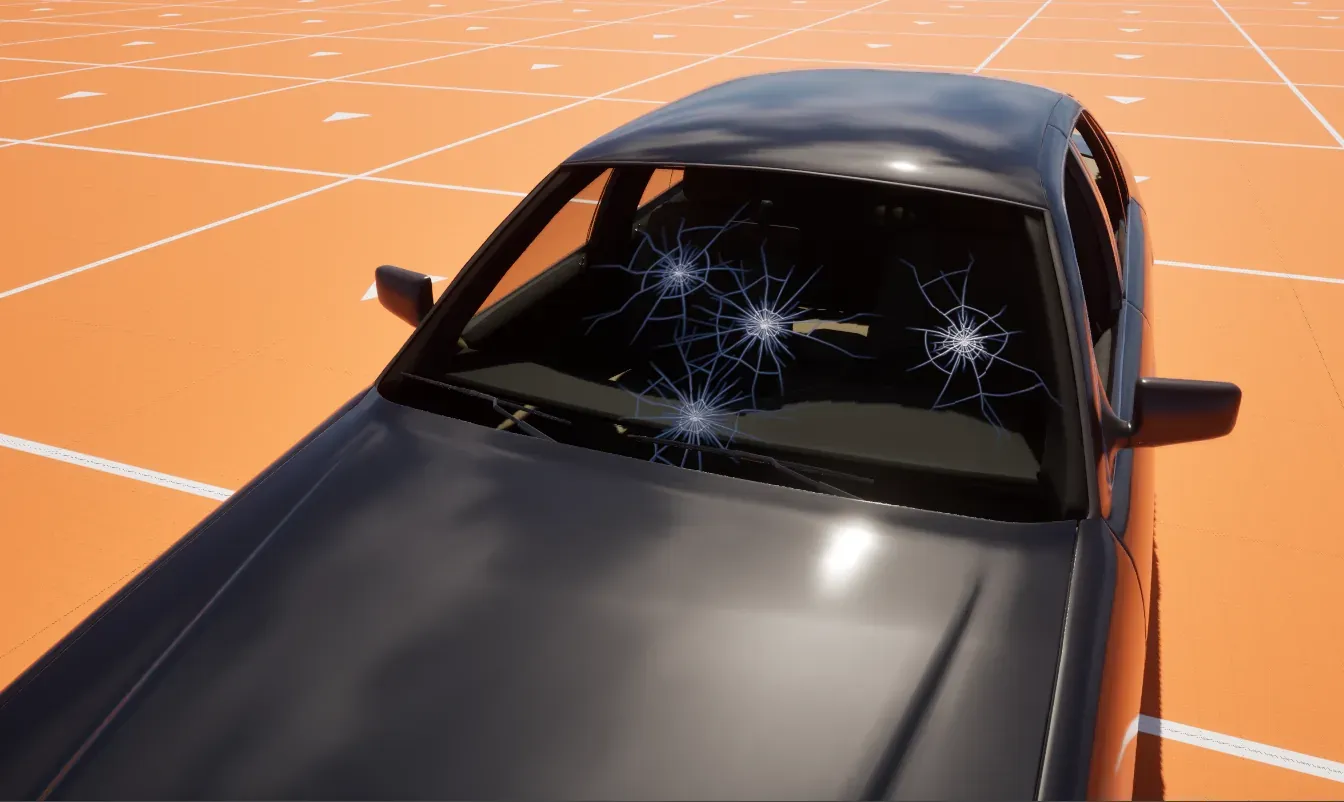
Then run Crushform.DebugImpact 15 at the same window. At 15 m/s the pane breaks: it disappears, and shards fly away from the body. Crushform.RepairAll puts the pane back whole.
Troubleshooting
Section titled “Troubleshooting”- A hit near the window leaves no crack. The hit is below Crack Delta V (5 m/s in a new definition), or the vehicle’s adapter has Dirt and Dents off, so the frame and the link never judge the glass. Raise the hit, or lower Crack Delta V, or turn on Dirt and Dents.
- A broken window vanishes without shards. The definition has no shards. Build them with Build Glass Shards as in step 3 of Set it up.
- A bullet passes a window without a crack. Takes Point Damage is off, or the definition’s Hit Responses table has no row for that kind of hit. Turn the switch on and add a row for the kind.
- Shards fly out on the wrong plane from a curved window. The window’s static mesh is not set to Allow CPU Access, so the plugin fits a flat box to it. Turn the option on and rebuild the shards.
- A break right after play begins throws no shards. The default shard system loads in the background when play begins, and until it is in memory a break throws none. Set Shard System on the definition to a system of its own, which loads with the definition. Once the default is in memory, later breaks throw shards as usual.
- When several panes break at once, some shards are missing. Glass shards do not use the debris pool, so Max Live Debris Pieces (
UCFBreakableSettings::MaxLiveDebrisPieces) does not limit them. The live shards of all broken panes are capped byCrushform.Glass.MaxLiveShards, 512 by default. Past the cap, the oldest broken pane’s shards go first, and they vanish early. With the shipped presets a laminated windscreen breaks into up to 12 × 5 = 60 shards and a tempered side window into up to 16 × 4 = 64, so about eight laminated windscreens reach the default cap. Set the cap to 0 for no cap. Debris explains the pool that the debris pieces use. - The dedicated server shows no cracks. This is by design. A dedicated server judges the glass but draws nothing. Look at the cracks on a client.