SURFACESWHEELS AND SURFACES
Wheels and surfaces
The ground decides what a wheel does: how much dirt it throws onto the body, and what the tyre sounds and looks like on it. The plugin finds the ground under each wheel from its physical material, then looks that material up in a table. This page covers the table, the wheels the body reads, and how to add a ground of your own.
| Crushform | ||
|---|---|---|
| Surfaces | 7 Map elements | |
| Index [ 0 ] | ||
| Key | PM_CF_Asphalt | |
| Value | ||
| Dirt | ||
| Rolling Sound | SW_CF_Tire_Asphalt_Loop | |
| Rolling FX | NS_CF_Rolling_Asphalt | |
| Rolling FX Intensity Parameter | ||
| Index [ 1 ] | ||
| Index [ 2 ] | ||
| Index [ 3 ] | ||
| Index [ 4 ] | ||
| Index [ 5 ] | ||
| Index [ 6 ] | ||
| Default | ||
What it does
Section titled “What it does”Each physical material you use for a ground has a row in the surfaces table. The row says what a wheel on that ground gives the body in dirt, which rolling sound it plays and which rolling effect it shows. The shipped asset, DA_CF_Surfaces, has rows for the seven physical materials the plugin ships.
How it works
Section titled “How it works”- The table.
UCFSurfacesis a data asset. Its Surfaces map holds oneFCFSurfacerow per physical material, and its Default row serves a ground with no row, and a wheel in the air, which has no material. An empty field in a row stays empty. It does not borrow the Default row’s sound or effect. - A row.
FCFSurfacehas four fields. Dirt holds the rates of dust, mud, snow and wetness the ground gives the body, and the rates that take each kind off it. Rolling Sound is the sound a tyre makes on it. Rolling FX is a Niagara system. Rolling FX Intensity Parameter names the float parameter that takes the intensity. When it is empty, the project’s FXIntensityParameter is used. - The wheels. The wheels come from the vehicle. The generic vehicle adapter (
UCFVehicleAdapterComponent) traces the wheels in its Wheels list. Each entry takes a Wheel component on the owner: the wheel’s mesh, or the scene component the wheel turns on, which is how a wheel that sits on a bone is named. Radius is the tyre radius in cm, and 0 takes half the height of the mesh’s bounds the first time the list is used. Ground Channel is the channel the wheels trace, and Ground Probe Margin lets a tyre that is a few centimetres above the ground still touch it. A vehicle-system adapter, such as the Chaos one, reads its own wheels and ignores this list. - Wheel contacts. Each frame the owner’s host reports one
FCFWheelContactper wheel: where the tyre touches the ground, its radius, its surface speed, its physical material, whether it is on the ground, and aWheelIndexthat stays the same for the wheel’s life. A wheel in the air has its point and material left unread. The vehicle adapter fills these contacts from Build Wheel Contacts. Any other actor answersICFWheelHostitself. With no host, the body has no wheels and never gets dirty. - Reading a wheel. The deform component keeps what each wheel stands on.
GetWheelSurfacereturns the current state of a wheel, andOnWheelSurfaceChangedfires when a wheel’s physical material or grounded state changes. A change of speed alone fires nothing. - Dedicated server. The wheel-surface check does not run on a dedicated server.
Set it up
Section titled “Set it up”- In the Content Browser, choose Add > Miscellaneous > Data Asset, pick the class CFSurfaces and name the asset DA_MyGame_Surfaces.
- Open it. Set Default to the row you want for any ground without its own row.
- Add an entry to Surfaces for each ground. Pick the ground’s physical material as the key, then fill its Dirt rates, Rolling Sound and Rolling FX. Leave a field empty for none.
- In Project Settings > Plugins > Crushform, set Surfaces to DA_MyGame_Surfaces.
- On the vehicle’s adapter, fill Wheels with one entry per wheel: pick its Wheel component and set its Radius, or leave the radius at 0 to take it from the mesh.
- Set the physical material on each ground’s material under Physical Material, as Phys Material. The Core concepts page describes the surfaces setup in more detail.
Use it
Section titled “Use it”Blueprint can read a wheel’s surface from the deform component. The graph below runs when the custom event ReadWheelZero fires, reads wheel 0 and prints whether the wheel is on the ground.
From C++, read the surface of a wheel and check that it is on the ground before you use the material. The call needs the Crushform module (CFDeformComponent.h), which you add to PublicDependencyModuleNames in your module’s Build.cs.
const FCFWheelSurface Surface = Deform->GetWheelSurface(0);if (Surface.bGrounded && IsValid(Surface.PhysicalMaterial)){ // The wheel stands on Surface.PhysicalMaterial.}A custom vehicle that does not use the adapter implements the wheel host and reports its wheels. The interface method is in CFWheelHost.h of the Crushform module, and it has this signature:
void GatherCrushformWheelContacts_Implementation(TArray<FCFWheelContact>& OutContacts) const override;Give each wheel the same WheelIndex every frame, and report every wheel, grounded or not, so that a wheel leaving the ground is seen.
Key settings
Section titled “Key settings”| Property | What it does | Default |
|---|---|---|
FCFSurface::Dirt | The dirt rates of the surface, per second at the reference speed: Dust, Mud, Snow, Wet, and what each takes off the body. | 0 for every rate |
FCFSurface::RollingSound | The rolling sound on the surface. None means no rolling sound there. | None |
FCFSurface::RollingFX | The Niagara rolling effect on the surface. None means no effect there. | None |
FCFSurface::RollingFXIntensityParameter | The float parameter of the effect that takes the intensity. | None, which uses UCFWheelSettings::FXIntensityParameter |
UCFSurfaces::Surfaces | One row per physical material. | Empty in the class; the shipped asset has rows for seven |
UCFSurfaces::Default | The row of a ground with no row, and of a wheel in the air. | A row with empty fields |
UCFSettings::Surfaces | The surfaces asset the project uses. | /Crushform/Surfaces/DA_CF_Surfaces |
FCFAdapterWheel::Radius | The tyre radius of a wheel in the adapter’s list, in cm. 0 takes half the height of the mesh’s bounds. | 0 |
UCFVehicleAdapterComponent::GroundChannel | The channel the adapter’s wheels trace the ground on. | ECC_Visibility |
FCFWheelContact::bGrounded | Whether the wheel touches the ground. A wheel in the air leaves no dirt. | true |
FCFWheelContact::WheelIndex | The wheel’s index, stable for its life. INDEX_NONE means the host does not name its wheels. | INDEX_NONE |
Check that it works
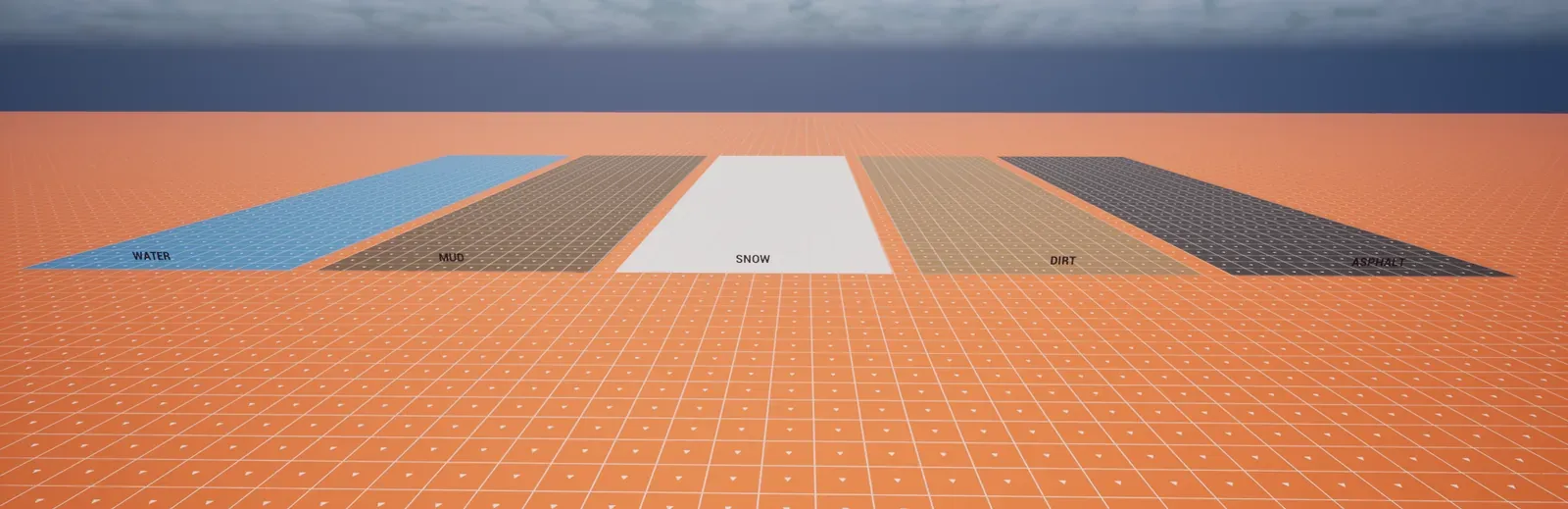
Section titled “Check that it works”Open DA_MyGame_Surfaces and check that it lists your grounds and the Default row. Then play Lvl_ProvingGround and drive the sedan from the ASPHALT strip onto the DIRT strip. The rolling sound crossfades to the new surface once it has held under the wheel for the tuning’s Surface Hold Time, 0.15 seconds by default.
Troubleshooting
Section titled “Troubleshooting”The wheels stay silent and the log says the surfaces do not load
Section titled “The wheels stay silent and the log says the surfaces do not load”Cause. The soft reference in the project settings points to an asset that does not load. The plugin logs once and the wheels stay silent:
Crushform surfaces %s do not load; wheels stay silentFix. Set Surfaces in Project Settings > Plugins > Crushform to an asset that exists, such as /Crushform/Surfaces/DA_CF_Surfaces.
A ground has a row but makes no sound
Section titled “A ground has a row but makes no sound”Cause. An empty Rolling Sound means no sound on that ground. The row does not borrow the Default row’s sound.
Fix. Set Rolling Sound on that row. The sound should be a looping asset: a sound that is not looping is logged, and it cuts out between restarts.
Every ground gives the same dirt
Section titled “Every ground gives the same dirt”Cause. The ground’s material has no physical material, or its physical material has no row. Either way the wheel gets the Default row.
Fix. Set Phys Material on the ground’s material, and add a row for that physical material to the surfaces table.
A wheel never reports a surface change
Section titled “A wheel never reports a surface change”Cause. A host that gives a wheel INDEX_NONE as its WheelIndex never gets that wheel reported to OnWheelSurfaceChanged. A host that reports only the wheels on the ground never sees a wheel leave it, because a wheel is grounded unless the host says otherwise.
Fix. Give each wheel a WheelIndex from 0 up, and report every wheel each frame, with bGrounded set to false while it is in the air.