WORLDDEBRIS
Debris
What it does
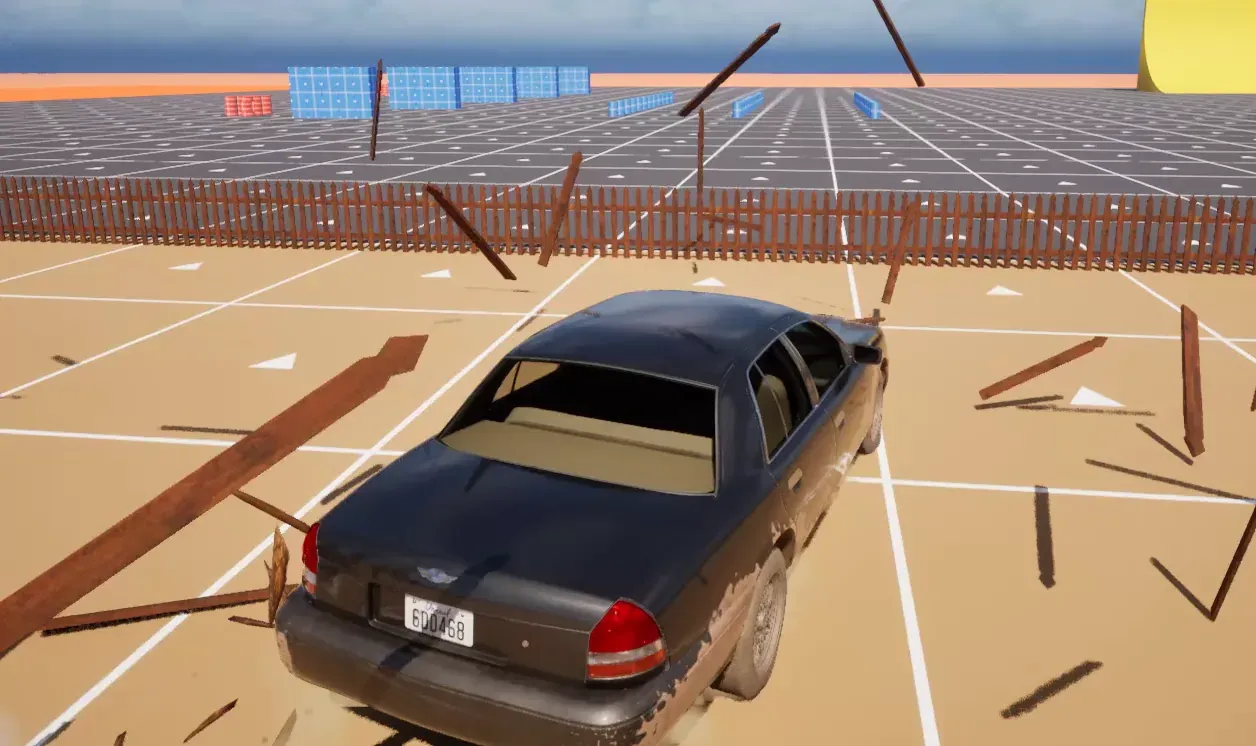
Section titled “What it does”When a fence section or a window breaks, its baked pieces fly out. They land, roll, lie for a while and sink away. Debris is the cosmetic part of a break. It does not replicate: each machine throws its own pieces when it sees the break.
Debris pieces are physics bodies. How cars and pawns meet them is set by the definition and by the collision profile, as the sections below describe.
How it works
Section titled “How it works”Debris is pooled. The UCFDebrisSubsystem world subsystem keeps a fixed set of piece components and reuses them. When a unit breaks, the subsystem takes free pieces from the pool and throws the unit’s baked pieces. The pieces sit on the same local machine only.
- Who simulates it. Debris is client-side. A dedicated server never creates the subsystem, so it spawns no pieces.
- Where it spawns. A break farther than
DebrisMaxSpawnDistanceCm(10000 cm) from the local camera spawns no debris. - The throw. Pieces near the impact point inherit more of the hitting body’s velocity. Pieces far from it mostly topple. A piece that is at the impact point takes
InheritVelocityFraction(0.6) of the body’s speed, plusScatterSpeedCmS(300 cm/s) outward and up. The push falls off overImpactFalloffCm(150 cm). - Collision. A piece collides with the world, with intact props and with other pieces, but not with pawns. Which object type it uses is set by the Debris Collision Profile in the project settings. A definition with
bDebrisCollidesWithDebrisoff makes its pieces ignore other pieces. - Vehicles. Vehicle bodies pass through a piece, unless the definition sets
bDebrisPushedByVehicles. Then a car pushes the piece one way forDebrisVehicleContactSeconds(3.5 s) after the break. A piece that lies on a vehicle keeps being pushed until it is off it. A pushed piece never counts as a hit on the car. - Lifetime. A piece that falls asleep lies still for
DebrisRestSeconds(3 s), then sinks forDebrisSinkSeconds(1 s): it goes straight down by its own size, its longest edge as scaled plus 10 cm, shrinking to a fifth of its size, and is hidden at the end.DebrisLifetimeSeconds(8 s) is a hard cap on its life, resting or not. - Budget. The game keeps at most
MaxLiveDebrisPieces(96) pieces; the oldest is recycled beyond that. Pieces of a definition whose debris lasts until the unit respawns (bDebrisLastsUntilRespawn) are counted apart, up toMaxPersistentDebrisPieces(64).
The pieces that a break throws are the baked pieces of the unit’s definition. See Fences and props for how a definition is baked.
Set it up
Section titled “Set it up”Debris has no asset of its own. Each breakable definition sets its own debris, and the project settings set the budget for all of it.
- In the Content Browser, open the fence definition,
DA_CF_FencePicket, from Plugins › Crushform Content › Fences (or your own definition). - In the Debris category, set Debris Lifetime Seconds, Debris Rest Seconds and Debris Sink Seconds. Turn on Debris Pushed by Vehicles if cars should push the pieces.
- Open Project Settings › Plugins › Crushform Breakable. In the Debris group, set Max Live Debris Pieces and Debris Collision Profile. The profile’s tooltip asks for one that rests on the world and ignores pawns. The default is
None, which makes a piece physics-only: no trace, sweep or overlap finds it.
| Debris | ||
|---|---|---|
| Max Live Debris Pieces | 96 | |
| Max Persistent Debris Pieces | 64 | |
| Debris Max Spawn Distance Cm | 10000.0 | |
| Debris Impact Cooldown Seconds | 0.25 | |
| Debris Min Impulse Per Kg | 50.0 | |
| Debris Impulse Per Kg for Full Intensity | 600.0 | |
| Debris Collision Profile | None | |
Use it
Section titled “Use it”The subsystem has no Blueprint node, so a Blueprint cannot change the pool or spawn pieces. It can read a definition’s Debris values, because they are BlueprintReadOnly. The graph below holds a fence definition in a variable and prints its Debris Lifetime Seconds when a custom event fires.
A game that wants to read or clear the pool does it in C++:
#include "CFDebrisSubsystem.h"
void ReportAndClearDebris(const UObject* WorldContext){  if (UCFDebrisSubsystem* Debris = UCFDebrisSubsystem::Get(WorldContext))  {    UE_LOG(LogTemp, Log, TEXT("Live debris pieces: %d"), Debris->GetLivePieceCount());    Debris->ReleaseAllPieces();  }}
The signatures are static UCFDebrisSubsystem* Get(const UObject* WorldContext), int32 GetLivePieceCount() const and void ReleaseAllPieces(). ReleaseAllPieces returns every live piece to the pool at once, without sinking.
A game that gives the pool its own camera and feedback implements ICFBreakableHost in C++ and registers it with SetHost. The interface has two methods, TryGetBreakableViewLocation(FVector&) const, which gives the point the debris is culled from, and PlayBreakableFeedback(const FCFBreakableFeedback&), which plays the sound and effect of a break. It is C++ only: it cannot be implemented in a Blueprint.
#include "CFBreakableHost.h"#include "CFDebrisSubsystem.h"
class FMyBreakableHost : public ICFBreakableHost{public:  virtual bool TryGetBreakableViewLocation(FVector& OutLocation) const override;  virtual void PlayBreakableFeedback(const FCFBreakableFeedback& Feedback) override;};
// The pool does not own the host: keep it alive while it is registered.void RegisterBreakableHost(const UObject* WorldContext, ICFBreakableHost* Host){  if (UCFDebrisSubsystem* Pool = UCFDebrisSubsystem::Get(WorldContext))  {    Pool->SetHost(Host);  }}
The C++ block needs the CrushformBreakable module in your Build.cs (see Installation). Unless Use Default Breakable Host is off in the Crushform Impact Feedback settings, the plugin’s default host, UCFImpactBreakableHost, registers itself and maps the breaks to impact events. See Impact feedback.
A primitive that stands for one unit of a units component implements ICFBreakableUnitPart in C++, through GetBreakableUnits. That is how a hit on the primitive is traced back to its unit. It is C++ only too.
Key settings
Section titled “Key settings”The debris values are on the breakable definition, in the Debris category. The budget and the collision profile are in the project settings. The defaults are the plugin’s.
| Property | What it does | Default |
|---|---|---|
UCFBreakableDefinition::bDebrisLastsUntilRespawn | Pieces lie until the unit stands again, instead of sinking. | false |
UCFBreakableDefinition::bDebrisPushedByVehicles | Vehicle bodies push the pieces, one way, for the contact time. | false |
UCFBreakableDefinition::DebrisVehicleContactSeconds | How long after the break vehicles push the pieces. 0 means for as long as they lie. | 3.5 |
UCFBreakableDefinition::bDebrisCollidesWithDebris | Whether a piece collides with other pieces. | true |
UCFBreakableDefinition::DebrisLifetimeSeconds | The hard cap on a piece’s life, resting or not. | 8 |
UCFBreakableDefinition::DebrisRestSeconds | How long a piece lies still before it sinks. | 3 |
UCFBreakableDefinition::DebrisSinkSeconds | How long a piece takes to sink away. | 1 |
UCFBreakableDefinition::InheritVelocityFraction | Share of the hitting body’s velocity the piece at the impact point gets. | 0.6 |
UCFBreakableDefinition::ScatterSpeedCmS | Extra outward and upward speed at the impact point, in cm/s. | 300 |
UCFBreakableDefinition::ImpactFalloffCm | Pieces this far from the impact point get the weakest throw. | 150 |
UCFBreakableSettings::MaxLiveDebrisPieces | Live pieces per world. The oldest is recycled beyond this. | 96 |
UCFBreakableSettings::MaxPersistentDebrisPieces | Live pieces of definitions whose debris lasts until respawn. | 64 |
UCFBreakableSettings::DebrisMaxSpawnDistanceCm | A break farther than this from the local camera spawns no debris. | 10000 |
UCFBreakableDefinition::MaxAngularSpeedDegS | The highest spin a thrown piece gets, in degrees per second. | 540 |
UCFBreakableSettings::DebrisCollisionProfile | The collision profile of the pieces. | None |
UCFBreakableSettings::DebrisImpactCooldownSeconds | The shortest time between two hit feedbacks of one piece. | 0.25 |
UCFBreakableSettings::DebrisMinImpulsePerKg | The impulse per kilogram a piece hit needs before it plays feedback. | 50 |
UCFBreakableSettings::DebrisImpulsePerKgForFullIntensity | The impulse per kilogram at which a piece hit plays at full strength. | 600 |
Check that it works
Section titled “Check that it works”In any build except Shipping, open the console with the tilde key.
stat CrushformDebrisshows the debris cycles. The pool’s live count isGetLivePieceCount, which the C++ example above reads.- Break a fence section in
Lvl_ProvingGround. Pieces fly out, land, lie and sink. - Drive a car into a picket that a definition has set to
bDebrisPushedByVehicles. The car pushes the piece forDebrisVehicleContactSeconds, then drives through it. - Open the debug panel and use Clear debris under World. Every piece goes back to the pool at once. See Debug mode.
Troubleshooting
Section titled “Troubleshooting”A break throws no pieces
Section titled “A break throws no pieces”Cause. The definition has not been baked, and a definition with no baked pieces spawns none. Or the break happens farther than DebrisMaxSpawnDistanceCm (10000 cm) from the local camera, or on a dedicated server, which never spawns debris.
Fix. Bake the definition with Bake Pieces. Stand closer to the break to test it. A dedicated server does not show debris by design: the clients show it.
Pieces disappear too soon
Section titled “Pieces disappear too soon”Cause. The pool is full. Beyond MaxLiveDebrisPieces (96) the oldest piece is recycled, and a piece that is past DebrisLifetimeSeconds (8 s) is removed even if it is still lying there.
Fix. Raise Max Live Debris Pieces, or set DebrisLifetimeSeconds higher. For pieces that should stay until the unit respawns, turn on bDebrisLastsUntilRespawn, and raise Max Persistent Debris Pieces if the budget for them runs out.
A car drives through the pieces
Section titled “A car drives through the pieces”Cause. bDebrisPushedByVehicles is off, which is the default. Or it is on, and DebrisVehicleContactSeconds has passed, after which vehicles pass through the piece again.
Fix. Turn Debris Pushed by Vehicles on for pieces that should move under a car, and set Debris Vehicle Contact Seconds to how long the push should last.
A pawn walks through the pieces
Section titled “A pawn walks through the pieces”Cause. Pieces collide with the world, intact props and each other, but not with pawns. That is the design, and the Debris Collision Profile sets it.
Fix. To have pieces stop a pawn, set Debris Collision Profile to a profile that blocks pawns. Then check that the pieces still rest on the world.
A piece hit plays the impact tag the definition names as Debris Impact Tag, or Crushform.Impact.Prop.Debris when that is empty. The cooldown and impulse limits above decide when it plays. For the tags and their sounds, see Impact feedback.