MULTIPLAYERREPLICATION AND PREDICTION
Replication and prediction
Every player sees the same damage. One machine simulates each vehicle and decides its damage, and the other machines receive the result. The driving machine does not wait for that result: it draws its own hits at once, and the server confirms or refuses them a moment later. This page covers who decides, how a hit travels between machines, and what replicates.
What it does
Section titled “What it does”A crash on one client dents the body on that client at once. The server then confirms the dent, and every other player sees the same dent on their screen.
How it works
Section titled “How it works”Authority
Section titled “Authority”Authority on the vehicle adapter picks the machine that simulates the vehicle and judges its hits. The two models and the ram allowance are described in Core concepts; the rules the server applies to each report are below.
Prediction
Section titled “Prediction”With the Owning Client model, the driving client applies each hit to its own lattice at once. It applies the report it will send, decoded the way the server decodes it, so both machines end up with the same numbers. A hit over the client’s report budget (Max Reports Per Second) is not drawn at all, rather than drawn and taken back later.
The client sends its reports to the server in batches of up to Max Reports Per Batch. The server checks each report before it applies it. The repair generation must match. The point must lie inside the lattice. The speed and the slide must stay within Max Plausible Delta V and the scrape limits. The host can refuse the report as well. A refused report comes back to the client as a rejection, and the client takes its dent out again. A prediction that the server neither confirms nor refuses within Pending Report Timeout is dropped.
A machine that stops being the impact source, for example because the vehicle now belongs to another player, drops its unsent predictions. From then on the new source’s hits arrive as chunks.
What replicates
Section titled “What replicates”The server holds the true lattice and sends it in chunks, as Core concepts describes. The following also replicate:
- Generation: the number of repairs. Chunks and reports of another generation are ignored.
- Wash count: a wash makes every machine clear its dirt. The dirt itself never travels over the network.
- Detached and swinging parts: which hinged parts are off, and which ones the machine that simulates the vehicle let swing. Every machine lets a part go when that word arrives, so all players see the same part come loose at the same moment. The swing itself is each machine’s own physics.
- Glass cracks, breakable unit levels and recent break events, and the state of felled trees. See Late joiners for what a machine that connects later receives.
- Impact sounds: the impact source plays a hit and relays it. Every other machine plays the relayed copy.
The tyres, the rolling sound and FX, and the engine sound do not replicate. Each machine runs its own.
Set it up
Section titled “Set it up”-
In the Content Browser, open Settings and tick Plugin Content. Open Plugins › Crushform Content › Blueprints › Sedan, duplicate
BP_VehicleAdvSedaninto your project, and open the copy. This page uses the sedan as the example, but the steps apply to any vehicle with the adapter. -
In the Components panel, select CF_Adapter, the Chaos vehicle adapter (
UCFChaosVehicleAdapterComponent). It inherits Authority from the base adapter class. -
In the Details panel, set Authority to Owning Client.
-
Leave Ram Allowance Mps at its default, 15, or raise it if your hard rams are refused. It is the speed margin the server allows above the recent peak.
Crushform Authority Ram Allowance Mps 15.0 m/s The Crushform category of the Chaos adapter, with Authority set to Owning Client. -
Check that Deform Profile is set. An empty value takes the project’s default profile.
-
Open Project Settings › Plugins › Crushform › Network. The defaults work for a first test. The table below lists what each one does.
-
Set Default Pawn Class of the game mode you play to your copy. The plugin’s
BP_VehicleAdvGameModespawns the plugin’s own sedan as the pawn, so a copy that is not the Default Pawn Class never drives in a game, and its Owning Client setting does nothing there. -
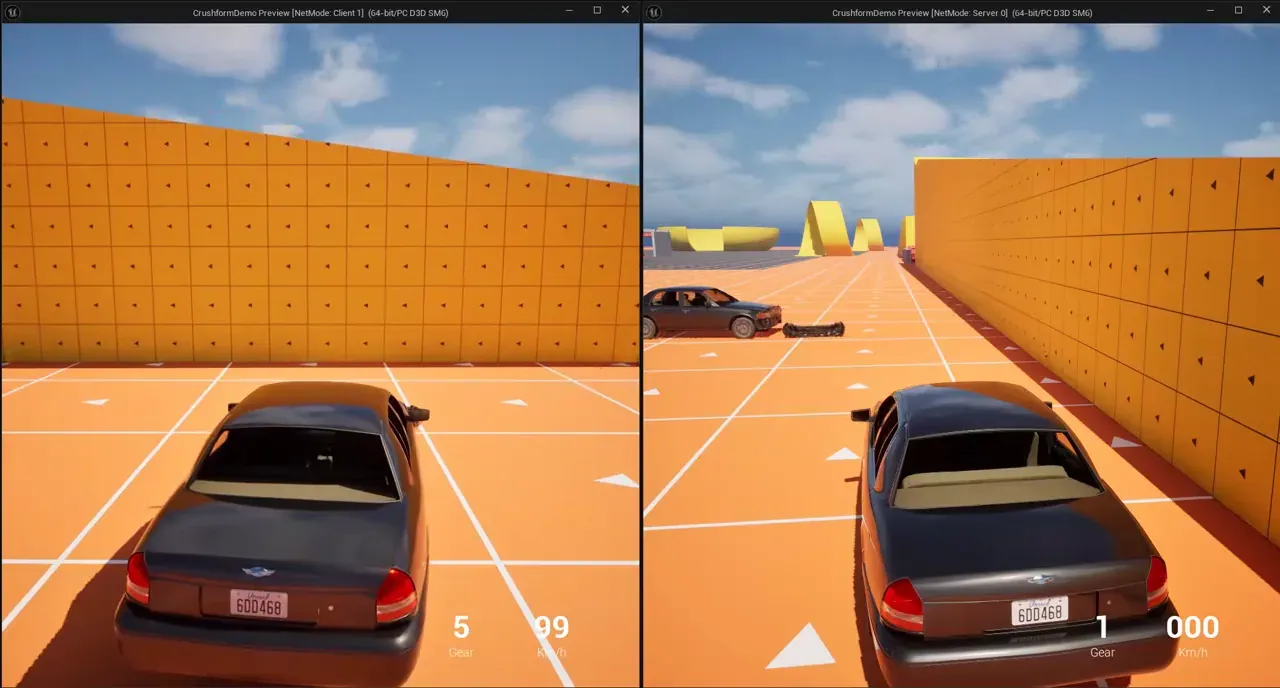
Save the Blueprint. In the Play settings, set Number of Players to 2 and Net Mode to Play As Listen Server, then press Play. The editor opens a server window (NetMode: Server 0) and a client window (NetMode: Client 1). Drive the car into a wall in the client window and watch the server window.
Use it
Section titled “Use it”A common Blueprint task is to repair a vehicle on the server. Repair and Wash run only on the machine with authority, and what they clear replicates to every machine. The graph calls Repair from a custom event, which you call from the server, for example from a server RPC of your own.
The same calls in C++:
// The vehicle actor that owns the adapter.AActor* Vehicle = GetOwner();if (UCFDeformComponent* Deform = Vehicle->FindComponentByClass<UCFDeformComponent>()){  if (Vehicle->HasAuthority())  {    // Clears every dent and scratch, on every machine.    Deform->Repair();  }
  // Hits this client sent that the server has not yet confirmed or refused.  const int32 Waiting = Deform->GetNumPendingReports();  // How many repairs the body has had.  const uint8 Generation = Deform->GetGeneration();}
Key settings
Section titled “Key settings”| Property | What it does | Default |
|---|---|---|
UCFVehicleAdapterComponent::Authority | Which machine simulates the vehicle and judges its hits: Server or Owning Client. | Server |
UCFVehicleAdapterComponent::RamAllowanceMps | With Owning Client: how much faster than the recent peak speed, in m/s, a reported hit may be. | 15 |
UCFProfile::MaxPlausibleDeltaV | The hardest hit, in m/s, that a report may carry. A slide is held to the same limit. | 40 |
UCFSettings::MaxReportsPerBatch | Reports a driving client sends in one batch per frame. The server refuses the rest of a bigger batch. | 8 |
UCFSettings::MaxReportsPerSecond | Reports per second that one component accepts. A client’s burst is the same size; the server’s bucket is 1.5 times deeper. | 60 |
UCFSettings::PendingReportTimeout | Seconds a client keeps a predicted hit that the server has neither confirmed nor refused. | 10 |
UCFSettings::ScrapeReportInterval | Seconds between two scrape reports of one component. | 0.1 |
UCFSettings::MaxScrapeDt | The longest slide, in seconds, that one scrape report may stand for. | 0.25 |
Check that it works
Section titled “Check that it works”Run the two-player test from Set it up. In the editor console, enter Crushform.Stats once. It prints one line for each deformable vehicle in each playing world. The line of the server’s copy says server lattice, and the line of the client’s copy says client view. Each line reads:
<vehicle>: <server lattice or client view>, generation <n>, <n> pending, <n> chunks | hits <n>, sent <n>, accepted <n>, rejected <n>, published <n>, received <n>, bad <n>, expired <n>, parts off sent <n>, accepted <n>, rejected <n>, collision builds <n>, longest <ms> ms, collision waits <n>, parts held <n>, part hulls <n>, longest <ms> ms, most points <n>After a crash on the client, its pending count rises and falls back to 0 once the server confirms the dent, and the server’s accepted count rises. A refused hit shows up as a rejected count on the client.
Troubleshooting
Section titled “Troubleshooting”A client’s dent disappears
Section titled “A client’s dent disappears”Cause. The server refused the report, and the client took the dent back. The server refuses a report when its speed or slide is above Max Plausible Delta V, when its point lies outside the lattice, or when its repair generation is old. Under Owning Client, a hit harder than the recent peak speed plus Ram Allowance Mps is refused too.
Fix. Read the rejected count in Crushform.Stats. Set Authority to Owning Client if clients should judge their own hits. If real hits are harder than Max Plausible Delta V, raise it on the profile.
A client’s hits do not dent at all
Section titled “A client’s hits do not dent at all”Cause. The vehicle’s Authority is Server. The client is then not the impact source, so it predicts nothing and waits for the server’s chunks.
Fix. Set Authority to Owning Client, as in Set it up.
A dent goes back after several seconds
Section titled “A dent goes back after several seconds”Cause. The server did not confirm the client’s report within Pending Report Timeout (10 seconds by default), and the client dropped the prediction.
Fix. Look for rejected and expired in Crushform.Stats. If the time-out is too short for your network, raise Pending Report Timeout under Network.