WORLDFENCES AND PROPS
Fences and props
What it does
Section titled “What it does”A fence is a row of posts and spans, laid along a spline in your level. A car that drives into a unit of it breaks that unit: a picket splinters, a chain-link panel topples. The car loses some of its speed, and the broken pieces are thrown into the air as debris.
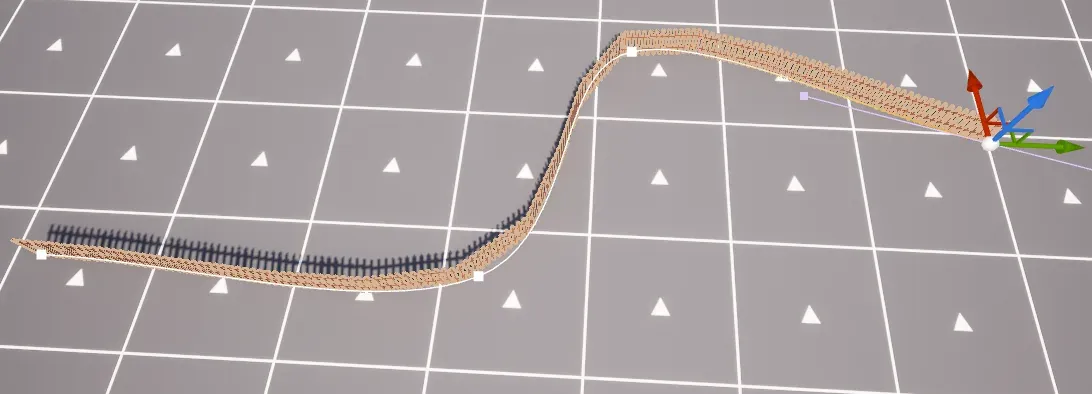
The Proving Ground has two fences of this kind, a wooden picket fence and a chain-link fence. Both are shipped as BP_CF_FencePicket and BP_CF_FenceChainLink.
How it works
Section titled “How it works”A fence is an ACFBreakableFence actor. Its Spline is the line. The actor puts the posts and spans along it, and each post or span is one unit. A unit has a set of levels, from intact to its last broken shape. Hits raise a unit’s level, up to the unit’s top level.
- Definitions. What a unit is made of is a data asset of the class
UCFBreakablePropDefinition. The fence takes one definition for its spans and, optionally, one for its posts. A definition holds the mesh and the rules: how it breaks, what the car loses, when it respawns. - The layout. The line becomes units when the fence is constructed in the editor. The layout is saved with the actor. In a networked game the fence does not lay itself out again: its layout comes from the saved one.
- Baked pieces. The pieces a unit throws off are made from its intact mesh, by Bake Pieces on the definition. The bake saves them as assets next to the definition. A definition that has not been baked throws no pieces.
- Vehicles. A car that drives into a unit breaks it when the contact is fast enough. Each unit it breaks takes a share of the car’s speed, and a unit can dent the car’s body.
- Any body. A definition with Breaks from Any Body on breaks from any physics body or walking pawn that is heavy and fast enough, not only from a car.
| Bake | ||
|---|---|---|
| Bake as Single Piece | ||
| Density Kg Per Cm 3 | 0.0005 | |
| Max Piece Length Cm | 125.0 | |
| Min Piece Volume Cm 3 | 50.0 | |
| Cut Tilt Degrees | ||
| Bake Seed | 1 | |
| Bake Revision | 1 | |
| Pieces | 16 Array elements | |
The Bake category of the definition holds the Bake Pieces button. It replaces the previous bake. An editor utility Blueprint can run the same bake with the static BakePieces(Definition, OutError) of the CFBreakable Piece Bake Library (editor only).
Set it up
Section titled “Set it up”This uses the picket fence on the Proving Ground. To make a fence of your own, see step 3.
- In the Content Browser, the shipped fences are in Plugins › Crushform Content › Fences.
- Drag
BP_CF_FencePicketinto your level, or place anACFBreakableFencefrom the Place Actors panel. The length of the spline sets the count: the fence puts about one span on every Post Spacing Cm of the line. To make a longer row, stretch the spline. - For your own fence, first make a definition. In the Content Browser choose Add › Miscellaneous › Data Asset, pick the class CFBreakable Prop Definition and name it. Set its Intact Mesh to the mesh of the unit, then click Bake Pieces in the Bake category. The pieces appear next to the asset.
- Select the fence in the level. In the Details panel, under Fence, set Span Definition to your definition. Set Post Definition too if the line has posts.
| Fence | ||
|---|---|---|
| Post Definition | None | |
| Span Definition | DA_CF_FencePicket | |
| Post Spacing Cm | 0.0 | |
- Set Post Spacing Cm to the distance between posts. At
0it uses the tile length of the span definition. The fence sinks its posts into the ground by Post Sink Cm (5 cm by default), and snaps them to the ground when Snap to Ground is on.
Use it
Section titled “Use it”A Blueprint can break a unit with a hit. Trace for the unit with Line Trace For Objects over the object type of the units, not a channel. The default unit profile is OverlapAllDynamic: its units are WorldDynamic objects that overlap every channel, so a channel trace, such as one over Visibility, never stops at them. Give the trace the units’ object type, WorldDynamic by default, then apply the hit to the unit the trace finds with ApplyHitResultOnAuthority. It takes the Hit Result from the trace, a Strength and a Hit Kind: the kind must have a row in the definition’s Hit Responses, and the strength must reach one of its Hit Level Thresholds. Run this from a custom event, and call ApplyHitResultOnAuthority from server code, not from a client: it is static and runs only on the authority.
In C++, the same call applies a hit to a unit without a trace:
#include "CFBreakableInstancesComponent.h"#include "CFBreakableTypes.h"
// Needs the CrushformBreakable module in your Build.cs (see Installation).void BreakFirstUnitOnServer(UCFBreakableUnitsComponent* Units, const FVector& Location, const FVector& Direction){  if (IsValid(Units) && Units->GetUnitCount() > 0)  {    FCFBreakableHit Hit;    Hit.Location = Location;    Hit.Direction = Direction;    Hit.Strength = 900.f;    Hit.Kind = FName(TEXT("Bullet"));    Units->ApplyHitOnAuthority(0, Hit);  }}
The signature is virtual bool ApplyHitOnAuthority(int32 UnitIndex, const FCFBreakableHit& Hit), on UCFBreakableUnitsComponent. FCFBreakableHit has Location, Direction, Strength and Kind. Get the fence’s component from the actor with Fence->GetBreakableInstances(); it is a UCFBreakableInstancesComponent, a subclass of UCFBreakableUnitsComponent.
A kind with no row in Hit Responses does nothing, and a unit is raised only by the Hit Level Thresholds that the hit reaches. So before you test, add a row for your kind to the definition’s Hit Responses, with thresholds that your strength reaches. The example’s Bullet kind is only an example.
Key settings
Section titled “Key settings”The definition’s settings are in its Details panel. The fence’s are on the fence actor. The defaults are the plugin’s.
| Property | What it does | Default |
|---|---|---|
ACFBreakableFence::PostSpacingCm | The distance between posts. 0 uses the span’s tile length. | 0 |
ACFBreakableFence::bSnapToGround | Whether posts and spans snap to the ground under the line. | true |
ACFBreakableFence::PostSinkCm | How deep posts sink into the ground. | 5 |
UCFBreakablePropDefinition::TileLengthCm | How far apart neighbouring copies of the mesh stand along the fence. 0 uses the mesh’s own length along X. | 0 |
UCFBreakablePropDefinition::VehicleSpeedLossFraction | Share of the vehicle’s speed lost per broken unit. | 0.025 |
UCFBreakablePropDefinition::MaxVehicleSpeedLossCmS | The most speed, in cm/s, one unit takes from a vehicle. | 150 |
UCFBreakablePropDefinition::VehicleDentSpeedFraction | Share of the vehicle’s speed into the unit that dents its body. 0 means the unit never dents it. | 0.5 |
UCFBreakablePropDefinition::bBreaksFromAnyBody | Whether any physics body or walking pawn breaks the unit. | false |
UCFBreakablePropDefinition::AnyBodyMinMassKg | The lightest body that breaks the unit from any body. | 20 |
UCFBreakablePropDefinition::AnyBodyMinSpeedCmS | The slowest body that breaks the unit from any body, in cm/s. | 300 |
UCFBreakablePropDefinition::PawnMinSpeedCmS | The slowest walking pawn that breaks the unit, in cm/s. | 250 |
UCFBreakablePropDefinition::RespawnDelaySeconds | How long a broken unit stays down. 0 means it never comes back. | 300 |
UCFBreakableDefinition::HitLevelThresholds | Strength an outside hit needs to raise a unit to each level: the first entry to level 1, the next to level 2. | empty |
UCFBreakableDefinition::HitResponses | How each kind of outside hit affects the units. A kind with no row does nothing. | empty |
UCFBreakableDefinition::bBakeAsSinglePiece | Bake the whole intact mesh as one piece, with no sawing. | false |
UCFBreakableDefinition::MaxPieceLengthCm | Islands longer than this are sawn into chunks. | 60 |
UCFBreakableDefinition::DensityKgPerCm3 | Piece mass is the baked volume times this density. | 0.0005 |
UCFBreakableSettings::UnitCollisionProfile | The collision profile of the units’ instances. | None (uses OverlapAllDynamic) |
The project settings are under Project Settings › Plugins › Crushform Breakable, in the Units, Any Body and Respawn groups. A broken unit comes back, if its definition allows, once no player pawn is within RespawnClearRadiusCm (4000 cm) and no body of RespawnBlockingObjectTypes overlaps its spot.
Check that it works
Section titled “Check that it works”In any build except Shipping, open the console with the tilde key.
stat CFBreakableInstancesshows the Breakable Respawn Check and the any-body cycles.stat CFPropContactshows the vehicle side.- Drive into
BP_CF_FencePicket. A unit breaks apart, and its pieces scatter. - Drive into
BP_CF_FenceChainLink. Its panel topples.
Debug mode can respawn every broken prop in the world at once: the Respawn props button under World in its panel. See Debug mode.
Troubleshooting
Section titled “Troubleshooting”The fence has no units
Section titled “The fence has no units”Cause. The fence has no saved layout, and it is in a networked game. The log then shows this line:
%s: no saved layout; a networked fence must be placed and laid out in the editorA standalone game lays a fence out at runtime. A networked game does not, so each machine would pick its own units.
Fix. Place the fence in the editor, with its spline and span definition set, and let the layout build. Save the level. The layout is saved with the fence.
The fence is shorter than its line
Section titled “The fence is shorter than its line”Cause. The line asks for more units than the fence can hold, which is 256. With posts, that is 127 spans. The log then shows:
%s: %d spans requested, capped to %d; split the line into several fencesFix. Split the line into several fences, each with fewer spans.
A broken unit throws no pieces
Section titled “A broken unit throws no pieces”Cause. The unit’s definition has not been baked. A definition with no baked pieces spawns none. The break still happens, but there is nothing to throw.
Fix. Click Bake Pieces in the definition’s Bake category. A bake replaces the previous one, so bake again after you change the mesh or the bake settings.
A unit does not break from a body that is not a car
Section titled “A unit does not break from a body that is not a car”Cause. bBreaksFromAnyBody is off on the definition. Or the body is lighter than AnyBodyMinMassKg or slower than AnyBodyMinSpeedCmS, or the pawn is slower than PawnMinSpeedCmS.
Fix. Turn Breaks from Any Body on, and lower the mass and speed limits to suit the body you want to break the unit.
For the pieces themselves, see Debris. For the sounds and effects of a break, see Impact feedback.